

<?xml version="1.0" encoding="utf-8"?>
<feed xmlns="http://www.w3.org/2005/Atom">
  <author>
    <name>辛巳</name>
  </author>
  <generator uri="https://hexo.io/">Hexo</generator>
  <id>https://doc.lz-0315.com/</id>
  <link href="https://doc.lz-0315.com/" rel="alternate"/>
  <link href="https://doc.lz-0315.com/atom.xml" rel="self"/>
  <rights>All rights reserved 2026, 辛巳</rights>
  <subtitle>学习与记录</subtitle>
  <title>辛巳学习日志网</title>
  <updated>2026-06-10T08:05:18.858Z</updated>
  <entry>
    <author>
      <name>辛巳</name>
    </author>
    <category term="技术" scheme="https://doc.lz-0315.com/categories/%E6%8A%80%E6%9C%AF/"/>
    <category term="脑成像" scheme="https://doc.lz-0315.com/tags/%E8%84%91%E6%88%90%E5%83%8F/"/>
    <category term="AFNI" scheme="https://doc.lz-0315.com/tags/AFNI/"/>
    <category term="macOS" scheme="https://doc.lz-0315.com/tags/macOS/"/>
    <category term="编译" scheme="https://doc.lz-0315.com/tags/%E7%BC%96%E8%AF%91/"/>
    <content>
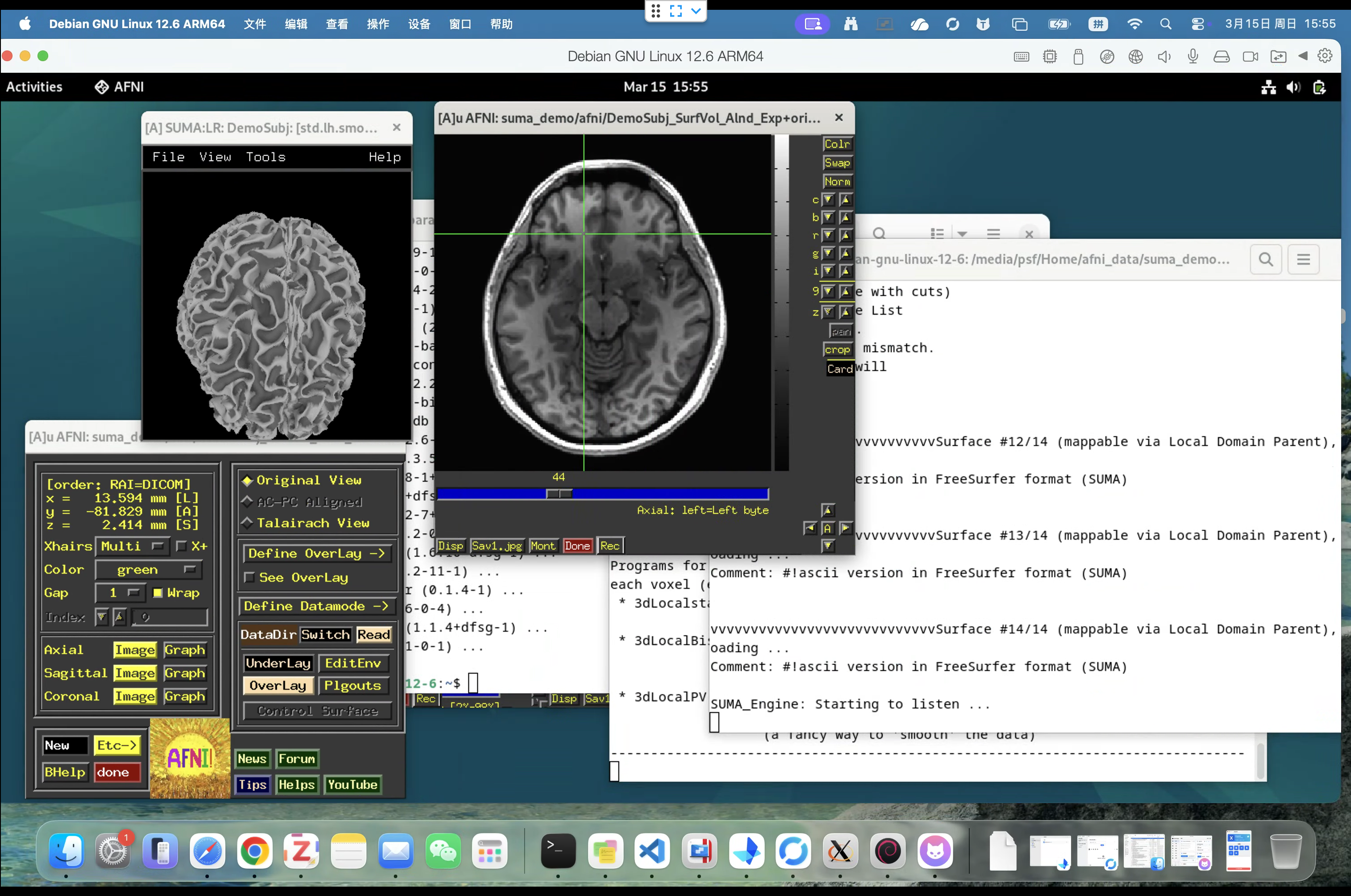
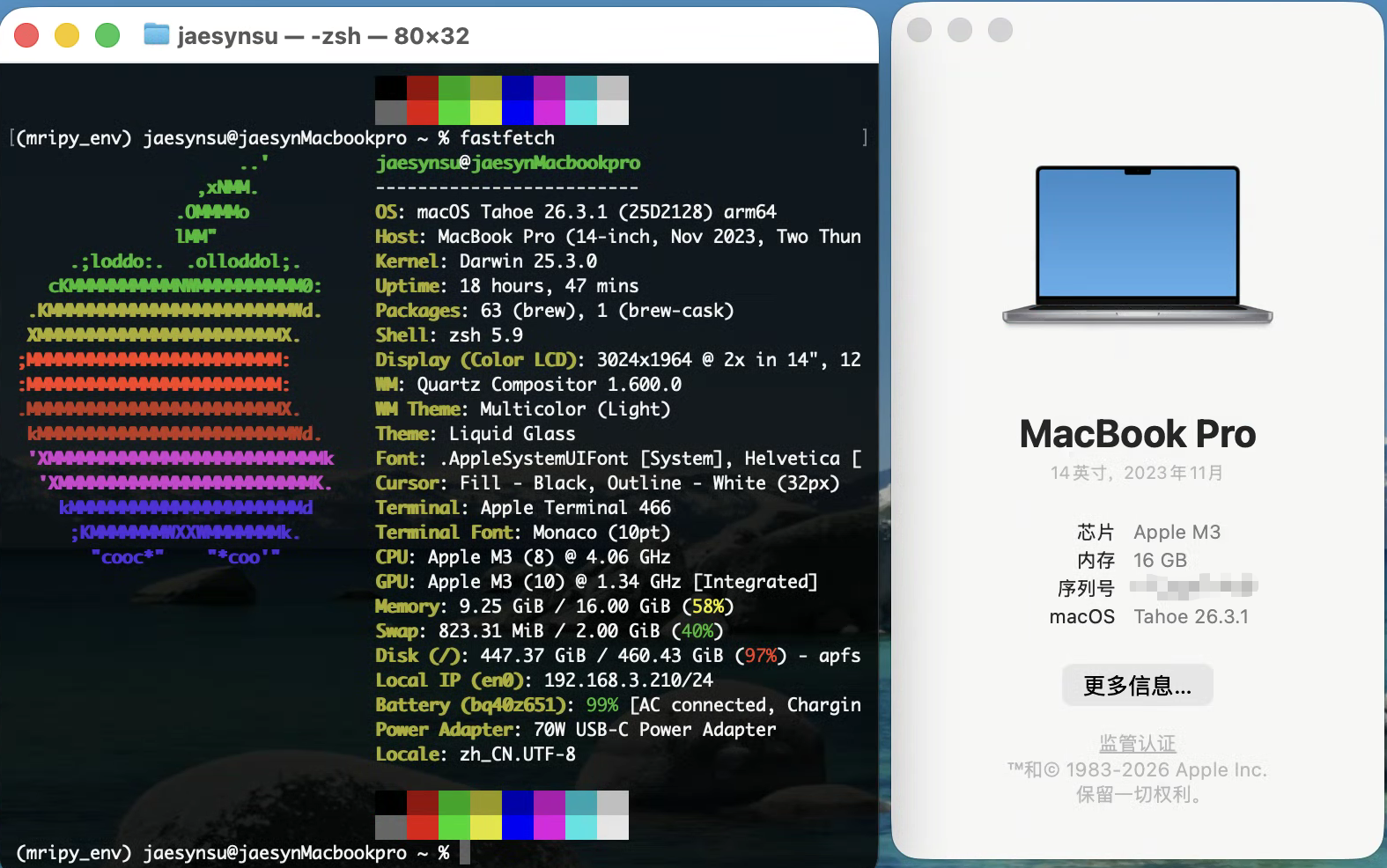
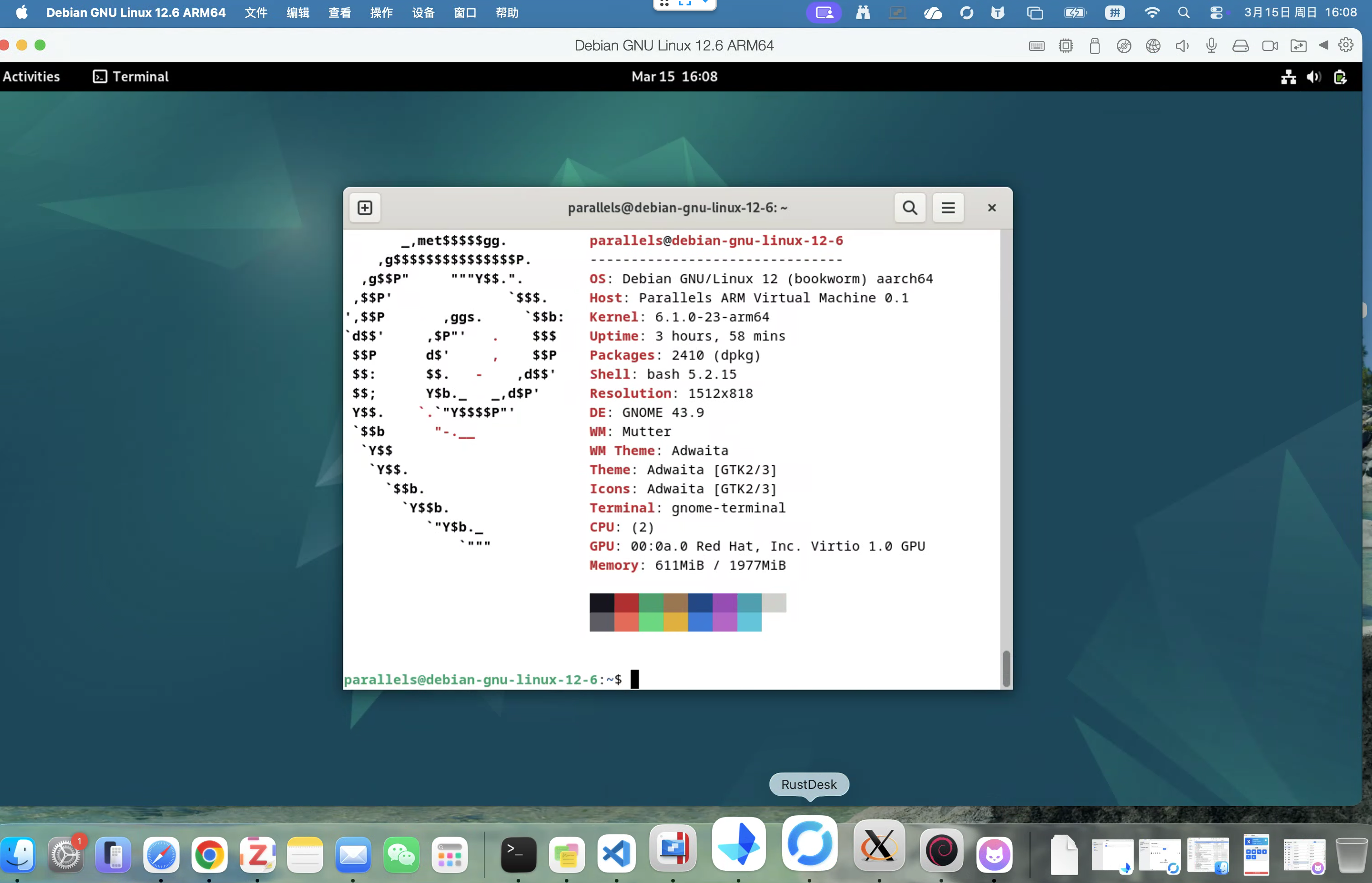
      <![CDATA[<h1 id="脑成像科研党福利：Debian-12-ARM64-手动编译-AFNI-SUMA-笔记-适配-macOS-Tahoe"><a href="#脑成像科研党福利：Debian-12-ARM64-手动编译-AFNI-SUMA-笔记-适配-macOS-Tahoe" class="headerlink" title="脑成像科研党福利：Debian 12 ARM64 手动编译 AFNI&#x2F;SUMA 笔记 (适配 macOS Tahoe)"></a>脑成像科研党福利：Debian 12 ARM64 手动编译 AFNI&#x2F;SUMA 笔记 (适配 macOS Tahoe)</h1><h3 id="0x00-前言"><a href="#0x00-前言" class="headerlink" title="0x00 前言"></a>0x00 前言</h3><p>最近 macOS 26 (Tahoe) 发布后，AFNI 官方针对 Liquid Glass 带来的 XQuartz 兼容性问题做了大量修复。虽然官方提供了 <code>@update.afni.binaries</code> 的建议，但对于追求极致稳定，或需要在 ARM 虚拟机（Parallels&#x2F;UTM）中跑 Debian 环境的同学来说，官方预编译包的缺失依然是个硬伤。</p><p>另外，很多同学尝试在 Apple Silicon 上通过 Rosetta 跑 x86_64 版的 Ubuntu 环境，但实测会遇到严重的隔离问题。例如在 Rosetta 下：</p><figure class="highlight bash"><table><tr><td class="code"><pre><span class="line"><span class="comment"># 必须使用极简环境才能启动，但会导致无法访问共享文件夹</span></span><br><span class="line"><span class="built_in">env</span> -i DISPLAY=:0 PATH=<span class="variable">$HOME</span>/abin:/usr/bin:/bin LIBGL_ALWAYS_SOFTWARE=1 ~/abin/suma</span><br><span class="line"></span><br></pre></td></tr></table></figure><p>这种方式虽然能点亮 SUMA，但<strong>没法读取 &#x2F;media&#x2F;psf&#x2F; 等共享文件夹</strong>，对于动辄几百 GB 的科研数据来说非常痛苦。为此，我折腾了两天在 <strong>Debian 12 ARM64</strong> 原生环境下完成了从源码编译 AFNI &amp; SUMA，特此分享</p><h3 id="0x01-运行实测与系统环境"><a href="#0x01-运行实测与系统环境" class="headerlink" title="0x01 运行实测与系统环境"></a>0x01 运行实测与系统环境</h3><ul><li><strong>运行实测</strong></li></ul><p><img src="/images/afni/test-run.png" alt="运行实测"></p><ul><li><strong>宿主机</strong>: macOS 26 (Tahoe) - Apple Silicon</li></ul><p><img src="/images/afni/host-env.png" alt="宿主机环境"></p><ul><li><strong>虚拟机</strong>: Debian GNU&#x2F;Linux 12 (bookworm) ARM64</li></ul><p><img src="/images/afni/vm-env.png" alt="虚拟机环境"></p><p>目前测试 DTI 追踪和基础 GUI 功能均正常，联动非常顺滑：</p><h3 id="0x02-为什么要折腾这个？"><a href="#0x02-为什么要折腾这个？" class="headerlink" title="0x02 为什么要折腾这个？"></a>0x02 为什么要折腾这个？</h3><ol><li><p><strong>规避宿主机 Bug</strong>：<br>虽然官方在 Tahoe 上努力修复了 GUI 问题，但目前调整窗口大小时偶发的黑屏 Bug 依然存在。在虚拟机里跑一个原生编译、针对 ARM 指令集优化的二进制版本，不仅能规避宿主机的系统层级显示干扰，还能利用虚拟机隔离环境进行大规模数据批处理，对科研生产力是极大的释放。</p></li><li><p><strong>Rosetta 仿真的局限</strong>：<br>在 Apple Silicon 虚拟机中通过 Rosetta 跑 x86_64 版本的 AFNI 时，为了能正常启动 SUMA，往往需要极度精简的环境变量（如 <code>env -i</code>）。</p></li></ol><ul><li><strong>痛点</strong>：虽然能启动，但由于环境被隔离，<strong>无法读取宿主机的共享文件夹</strong>（如 <code>/media/psf/</code>），这对需要处理大量外部硬盘数据的科研工作来说几乎是致命的。</li><li><strong>原生优势</strong>：原生 ARM64 编译版无需复杂的 <code>env</code> 隔离，完美支持挂载共享文件夹，实现数据流的无缝处理</li></ul><h3 id="0x03-核心踩坑与心得"><a href="#0x03-核心踩坑与心得" class="headerlink" title="0x03 核心踩坑与心得"></a>0x03 核心踩坑与心得</h3><ul><li><strong>GLIB 路径地狱</strong>：在 aarch64 下，<code>glibconfig.h</code> 的位置和传统的 x86 差异很大。编译时必须显式导出 <code>CPATH</code>，否则 <code>SUMA_gts</code> 会报错死在第一步。</li><li><strong>依赖补全</strong>：除了常规的 Motif，<code>libxi-dev</code> 和 <code>libxdevice-dev</code> 是在虚拟机里搞定 X11 转发的关键，少一个都会导致二进制文件无法生成。</li><li><strong>R 环境陷阱</strong>：别用 AFNI 自带的脚本去跑 R 包源码编译，ARM 下直接 <code>apt install r-cran-tidyverse</code> 等二进制包才是正解，能省去数小时的编译报错。</li><li><strong>去油脂模式</strong>：针对虚拟机环境，建议在 <code>.sumarc</code> 里强行开启 <code>SUMA_NoFancyStuff=YES</code>。实测在 X11 转发下，这样能极大减少由于 GPU 驱动兼容性导致的图形卡死。</li></ul><h3 id="0x04-成果分享"><a href="#0x04-成果分享" class="headerlink" title="0x04 成果分享"></a>0x04 成果分享</h3><p>我已经将针对 Debian 12 ARM64 优化的 Release 同步到了 GitHub，包含了一键编译脚本和预编译的二进制包，希望能给同样在 Apple Silicon 上做脑成像分析的同学省点时间。</p><ul><li><strong>项目地址</strong>: <a href="https://github.com/longzheng268/afni-gnu-linux-arm64/tree/gnu-linux-arm64">longzheng268&#x2F;afni-gnu-linux-arm64</a></li><li><strong>分支</strong>: <code>gnu-linux-arm64</code></li></ul><h3 id="0x05-交流"><a href="#0x05-交流" class="headerlink" title="0x05 交流"></a>0x05 交流</h3><p>向所有在 macOS 26 环境下克服 Xquartz 破碎问题的探险家致敬。如果你有更好的 ARM 架构优化参数，欢迎一起讨论。</p>]]>
    </content>
    <id>https://doc.lz-0315.com/posts/2026/03/15/%E8%84%91%E6%88%90%E5%83%8F%E7%A7%91%E7%A0%94%E5%85%9A%E7%A6%8F%E5%88%A9%EF%BC%9ADebian-12-ARM64-%E6%89%8B%E5%8A%A8%E7%BC%96%E8%AF%91-AFNI-SUMA-%E7%AC%94%E8%AE%B0-%E9%80%82%E9%85%8D-macOS-Tahoe/</id>
    <link href="https://doc.lz-0315.com/posts/2026/03/15/%E8%84%91%E6%88%90%E5%83%8F%E7%A7%91%E7%A0%94%E5%85%9A%E7%A6%8F%E5%88%A9%EF%BC%9ADebian-12-ARM64-%E6%89%8B%E5%8A%A8%E7%BC%96%E8%AF%91-AFNI-SUMA-%E7%AC%94%E8%AE%B0-%E9%80%82%E9%85%8D-macOS-Tahoe/"/>
    <published>2026-03-14T16:00:00.000Z</published>
    <summary>Debian 12 ARM64 手动编译 AFNI/SUMA 笔记，适配 macOS Tahoe，从源码编译到环境配置全流程。</summary>
    <title>脑成像科研党福利：Debian 12 ARM64 手动编译 AFNI/SUMA 笔记 (适配 macOS Tahoe)</title>
    <updated>2026-06-10T08:05:18.858Z</updated>
  </entry>
  <entry>
    <author>
      <name>辛巳</name>
    </author>
    <category term="技术" scheme="https://doc.lz-0315.com/categories/%E6%8A%80%E6%9C%AF/"/>
    <category term="GitHub" scheme="https://doc.lz-0315.com/tags/GitHub/"/>
    <category term="效率工具" scheme="https://doc.lz-0315.com/tags/%E6%95%88%E7%8E%87%E5%B7%A5%E5%85%B7/"/>
    <content>
      <![CDATA[<p>最近发现不少人在吐槽 GitHub 的 UI 越来越”社交化”，首页满屏都是 Follow 过的用户点赞了什么，想找个 <strong>Trending（热榜）</strong> 或者自己 <strong>Fork</strong> 的库反而像是在玩密室逃脱。</p><p>GitHub 现在的设计确实离谱，核心功能藏得极深。分享几个我常用的”直达路径”和降噪方案，希望能帮到觉得 GitHub 难用的朋友。</p><h3 id="1-核心功能直达（建议直接存书签）"><a href="#1-核心功能直达（建议直接存书签）" class="headerlink" title="1. 核心功能直达（建议直接存书签）"></a>1. 核心功能直达（建议直接存书签）</h3><ul><li><p><strong>实时热榜 (Trending)：</strong> <a href="https://github.com/trending">github.com&#x2F;trending</a><br>首页确实没有入口，这是最离谱的。想看最近火什么，直接点这个。</p></li><li><p><strong>已点赞的项目 (Stars)：</strong> <a href="https://github.com/stars">github.com&#x2F;stars</a><br>找以前收藏过的库，这里最快。</p></li><li><p><strong>查看所有的 Fork 库：</strong> <code>github.com/你的用户名?tab=repositories&amp;type=fork</code><br>别在首页翻，去 Repositories 标签页直接选 Type。</p></li></ul><h3 id="2-强迫症降噪方案"><a href="#2-强迫症降噪方案" class="headerlink" title="2. 强迫症降噪方案"></a>2. 强迫症降噪方案</h3><p>如果不想看那些没用的信息流（Feed），有两个办法：</p><ul><li><strong>官方设置：</strong> 点击首页 Feed 流右上角的 <code>Filters</code>，把 <code>Followed users&#39; activity</code> 取消勾选，世界立刻清净。</li><li><strong>神器插件：</strong> 强烈推荐安装 <a href="https://github.com/refined-github/refined-github">Refined GitHub</a>（浏览器插件）。它会重构 GitHub 的 UI，把 <code>Trending</code> 等常用链接直接挂在顶栏，还能砍掉各种反人类的社交设计。</li></ul><h3 id="3-效率工具推荐"><a href="#3-效率工具推荐" class="headerlink" title="3. 效率工具推荐"></a>3. 效率工具推荐</h3><ul><li><strong>GitHub Desktop：</strong> 管理自己的项目，客户端比网页快得多。</li><li><strong>Oh My Zsh &#x2F; GitHub CLI：</strong> 终端查 Repo 才是真正的”古法编程”效率。</li></ul><p><strong>总结：</strong> 既然 GitHub 想把自己做成微博，那我们就把它当成代码仓库的 API，直接通过 URL 或者插件去访问我们要的功能。</p><p>大家还有什么 GitHub 的隐藏高效用法，欢迎补充。</p>]]>
    </content>
    <id>https://doc.lz-0315.com/posts/2026/02/28/GitHub%E4%BD%BF%E7%94%A8%E6%8A%80%E5%B7%A7/</id>
    <link href="https://doc.lz-0315.com/posts/2026/02/28/GitHub%E4%BD%BF%E7%94%A8%E6%8A%80%E5%B7%A7/"/>
    <published>2026-02-27T16:00:00.000Z</published>
    <summary>GitHub 首页满屏社交信息流？分享几个直达核心功能的隐藏路径和降噪方案，让你快速找到 Trending、Stars、Fork 等常用功能。</summary>
    <title>GitHub 首页信息流太乱？分享几个&quot;直达核心&quot;的隐藏入口和优化方案</title>
    <updated>2026-06-10T08:05:18.858Z</updated>
  </entry>
  <entry>
    <author>
      <name>辛巳</name>
    </author>
    <category term="技术" scheme="https://doc.lz-0315.com/categories/%E6%8A%80%E6%9C%AF/"/>
    <category term="国产化" scheme="https://doc.lz-0315.com/tags/%E5%9B%BD%E4%BA%A7%E5%8C%96/"/>
    <category term="UOS" scheme="https://doc.lz-0315.com/tags/UOS/"/>
    <category term="自动化" scheme="https://doc.lz-0315.com/tags/%E8%87%AA%E5%8A%A8%E5%8C%96/"/>
    <category term="ARM" scheme="https://doc.lz-0315.com/tags/ARM/"/>
    <content>
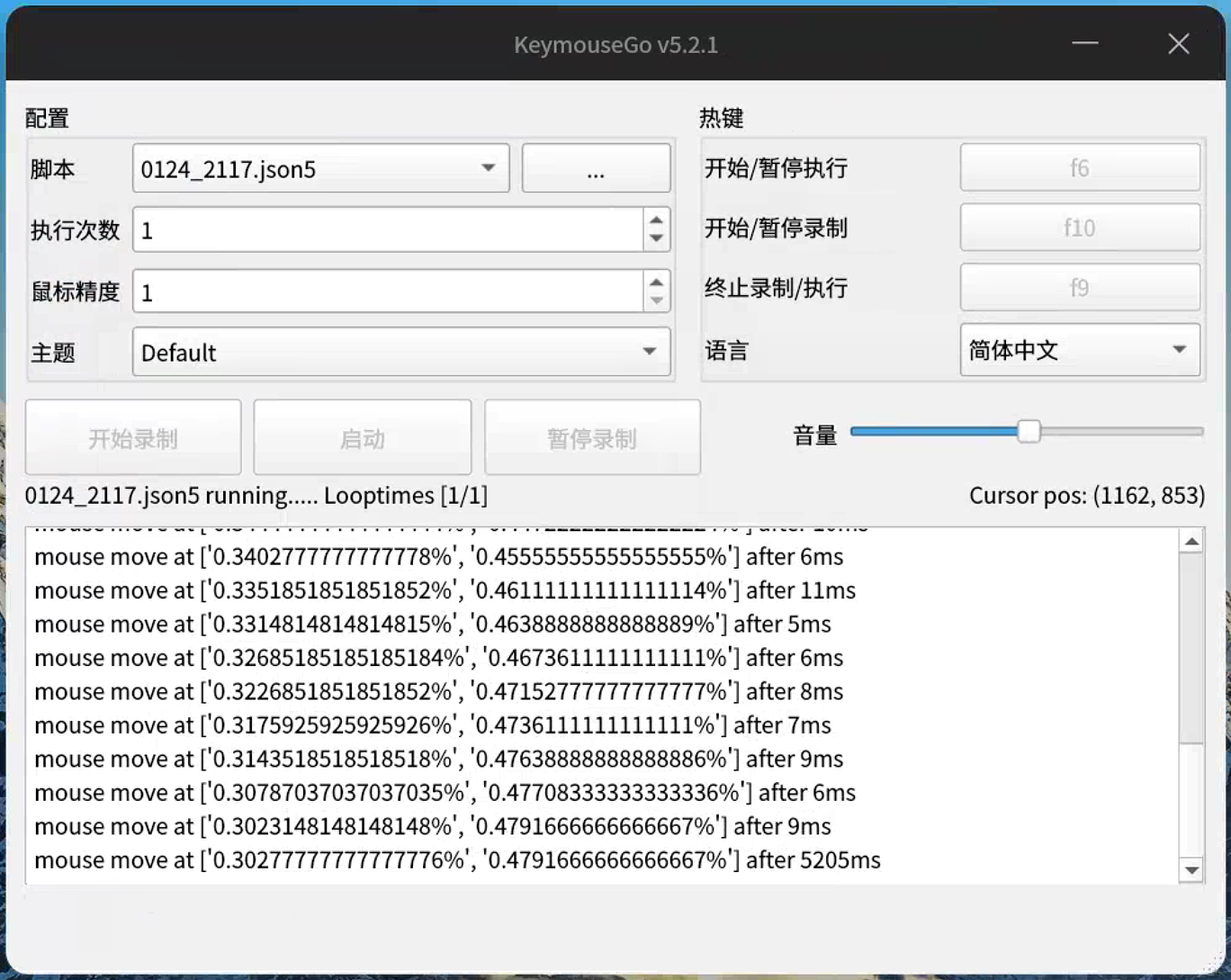
      <![CDATA[<h2 id="📦-发布信息：KeymouseGo-ARM64-分发版"><a href="#📦-发布信息：KeymouseGo-ARM64-分发版" class="headerlink" title="📦 发布信息：KeymouseGo ARM64 分发版"></a>📦 发布信息：KeymouseGo ARM64 分发版</h2><p>该版本专为国产化终端优化，支持华为麒麟芯片及 UOS 操作系统。</p><ul><li><p><strong>版本名称</strong>: <code>KeymouseGo_UOS_ARM64</code></p></li><li><p><strong>适配环境</strong>:</p></li><li><p><strong>OS</strong>: UOS 20 (UnionTech OS)</p></li><li><p><strong>Arch</strong>: ARM64 (AArch64)</p></li><li><p><strong>CPU</strong>: HUAWEI Kirin 9000C @ 2.188GHz</p></li><li><p><strong>XDG_SESSION_TYPE</strong>:X11</p></li><li><p><strong>原作地址</strong>: <a href="https://github.com/taojy123/KeymouseGo">原项目地址</a></p></li><li><p><strong>适配编译发行地址</strong>：<a href="https://github.com/longzheng268/KeymouseGo/releases/tag/v5.2.1-ARM64-UOS20">适配编译发行地址</a></p></li><li><p><strong>下载地址</strong>: <a href="https://115cdn.com/s/swfb23m368x?password=k0f5&#"><a href="https://115cdn.com/s/swfb23m368x?password=k0f5&#">115网盘</a></a></p></li><li><p><strong>访问码</strong>: <code>k0f5</code></p></li></ul><hr><h2 id="📝-Feature-Request-详情"><a href="#📝-Feature-Request-详情" class="headerlink" title="📝 Feature Request 详情"></a>📝 Feature Request 详情</h2><p><strong>标题</strong>: Support for UOS 20 on HUAWEI Kirin 9000C (ARM64)</p><p><strong>描述</strong>:<br>已实现在华为麒麟 9000C 处理器、UOS 20 操作系统上的兼容性适配。该 ARM64 版本能够在该环境下稳定运行，满足国产化平台自动化操作需求。</p><p><strong>环境截图预览</strong>:</p><ol><li><strong>系统配置与 CPU 信息</strong>:</li><li><strong>软件运行界面</strong>:</li><li><strong>录制与设置界面</strong>:</li></ol><p><img src="/images/keymousego/run-ui.png" alt="软件运行过程以及界面"></p><p><img src="/images/keymousego/device-info.png" alt="软件测试设备信息"></p><p><img src="/images/keymousego/env-detail.png" alt="软件测试环境更具体细节"></p>]]>
    </content>
    <id>https://doc.lz-0315.com/posts/2026/01/28/KeymouseGo-for-UOS/</id>
    <link href="https://doc.lz-0315.com/posts/2026/01/28/KeymouseGo-for-UOS/"/>
    <published>2026-01-27T16:00:00.000Z</published>
    <summary>该版本KeymouseGO专为国产化终端优化，支持华为麒麟芯片及 UOS 操作系统。</summary>
    <title>KeymouseGo for UOS 20 (ARM64/Kirin 9000C/X11)</title>
    <updated>2026-06-10T08:05:18.858Z</updated>
  </entry>
  <entry>
    <author>
      <name>辛巳</name>
    </author>
    <category term="AI" scheme="https://doc.lz-0315.com/categories/AI/"/>
    <category term="ChatGPT" scheme="https://doc.lz-0315.com/tags/ChatGPT/"/>
    <category term="提示词" scheme="https://doc.lz-0315.com/tags/%E6%8F%90%E7%A4%BA%E8%AF%8D/"/>
    <category term="谷歌" scheme="https://doc.lz-0315.com/tags/%E8%B0%B7%E6%AD%8C/"/>
    <content>
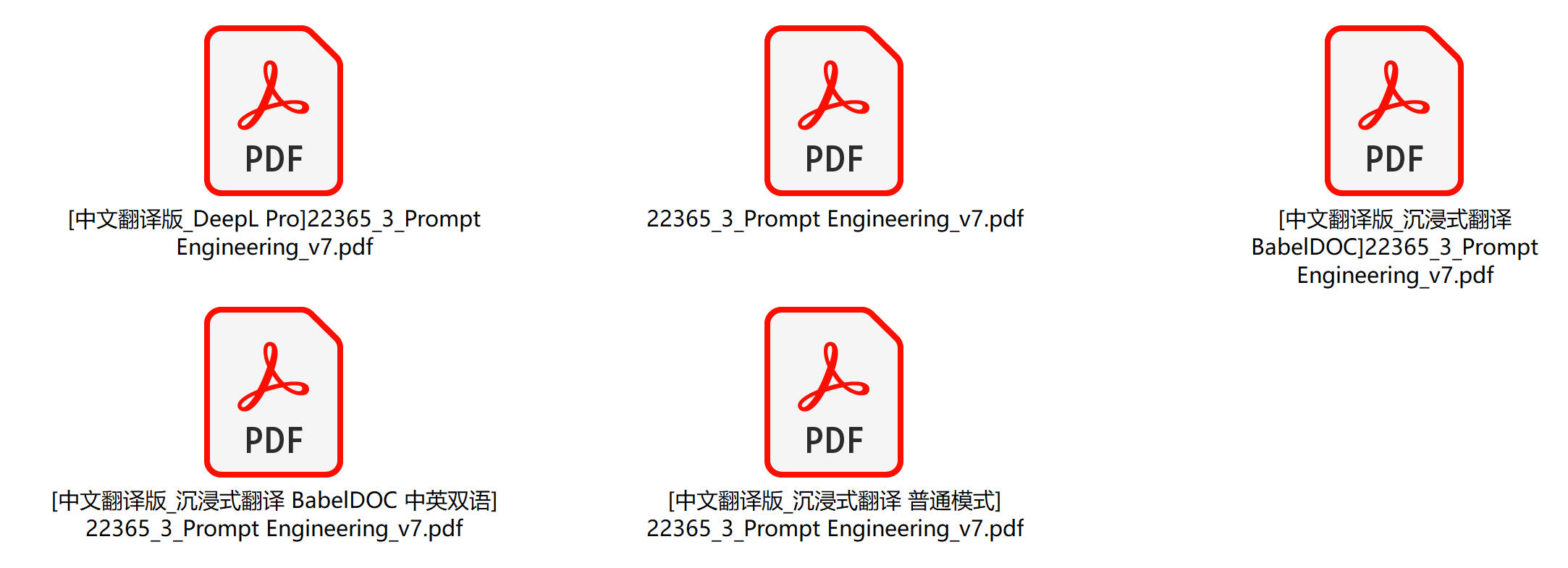
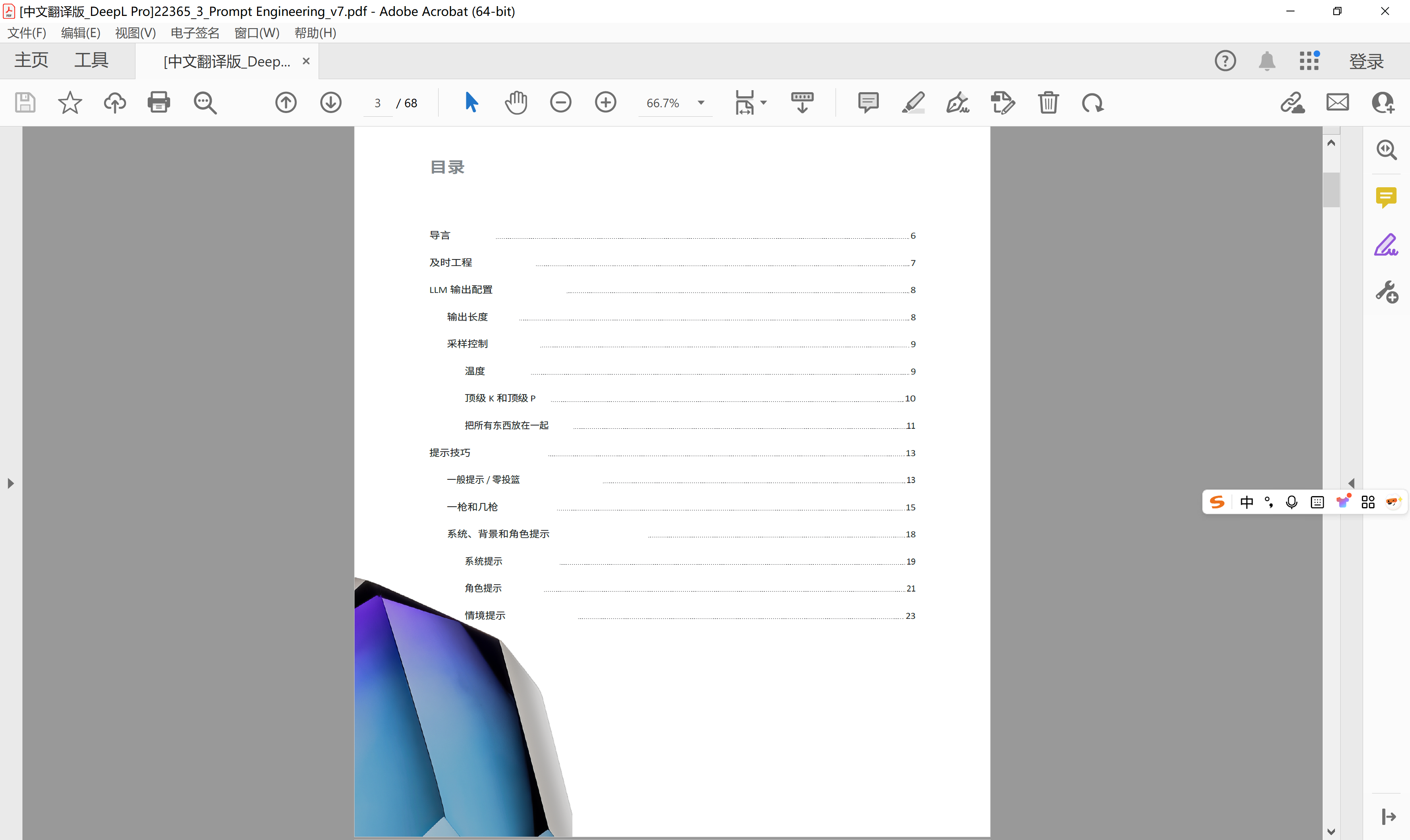
      <![CDATA[<p>谷歌的这份《Prompt Engineering》白皮书固然很高质，尤其是对AI提示词方面的理解，但遗憾的是全文是英文版，对于习惯中文阅读的小可爱们不方便。</p><p><img src="/images/prompt-engineering/5versions.png" alt="有5个不同版本的文档"></p><p><img src="/images/prompt-engineering/intro1.png" alt="其中一个版本的引言"></p><p><img src="/images/prompt-engineering/intro2.png" alt="另一个版本的引言"></p><p><img src="/images/prompt-engineering/toc.png" alt="提示词工程的目录部分"></p><p>原文来自：<a href="https://cloud.google.com/discover/what-is-prompt-engineering">https://cloud.google.com/discover/what-is-prompt-engineering</a></p><p>所以今天带来了几个版本的中文翻译，小可爱们可以按需下载阅读。</p><p><a href="https://2685772537.lanzouo.com/b020c0bb8b">蓝凑云网盘，密码为805h。</a></p>]]>
    </content>
    <id>https://doc.lz-0315.com/posts/2025/10/25/Prompt-Engineering/</id>
    <link href="https://doc.lz-0315.com/posts/2025/10/25/Prompt-Engineering/"/>
    <published>2025-10-24T16:00:00.000Z</published>
    <summary>谷歌 Prompt Engineering 白皮书中文翻译版，涵盖 AI 提示词工程的核心概念与实践。</summary>
    <title>谷歌《Prompt Engineering》白皮书中文翻译</title>
    <updated>2026-06-10T08:05:18.858Z</updated>
  </entry>
  <entry>
    <author>
      <name>辛巳</name>
    </author>
    <category term="服务" scheme="https://doc.lz-0315.com/categories/%E6%9C%8D%E5%8A%A1/"/>
    <category term="MRtrix3" scheme="https://doc.lz-0315.com/tags/MRtrix3/"/>
    <category term="脑成像" scheme="https://doc.lz-0315.com/tags/%E8%84%91%E6%88%90%E5%83%8F/"/>
    <category term="Linux" scheme="https://doc.lz-0315.com/tags/Linux/"/>
    <category term="Ubuntu" scheme="https://doc.lz-0315.com/tags/Ubuntu/"/>
    <content>
      <![CDATA[<p><strong>价格</strong>: 500元（可议价）</p><p>提供专业MRtrix3（扩散成像与纤维追踪软件）安装服务，适用于Ubuntu 22.04等Linux系统。服务包括：</p><ul><li>依赖包安装与配置（Qt5、Eigen、FFTW等）</li><li>源码编译与优化（支持多线程加速）</li><li>环境变量设置与PATH配置</li><li>验证测试（mrview启动与功能检查）</li></ul><h2 id="服务特点"><a href="#服务特点" class="headerlink" title="服务特点"></a>服务特点</h2><ul><li>远程指导，通过屏幕共享或命令行操作</li><li>解决常见问题（如OpenGL、依赖冲突）</li><li>确保MRtrix3正常运行</li><li>提供安装脚本与验证步骤</li></ul><h2 id="适用人群"><a href="#适用人群" class="headerlink" title="适用人群"></a>适用人群</h2><ul><li>神经影像研究人员</li><li>扩散张量成像（DTI）数据分析者</li><li>需要快速部署MRtrix3的用户</li></ul><h2 id="注意事项"><a href="#注意事项" class="headerlink" title="注意事项"></a>注意事项</h2><ul><li>需提供远程访问权限（SSH或桌面共享）</li><li>安装前确保系统至少10GB空余空间</li><li>服务时长约2-4小时，视复杂程度</li></ul><h2 id="联系方式"><a href="#联系方式" class="headerlink" title="联系方式"></a>联系方式</h2><p>请私信或留言，预约时间后开始安装。</p><p><a href="https://www.goofish.com/item?spm=a21ybx.personal.feeds.1.6c64527fesK15c&id=989392680701&categoryId=50023914">闲鱼链接</a></p>]]>
    </content>
    <id>https://doc.lz-0315.com/posts/2025/10/25/MRtrix3%E8%BD%AF%E4%BB%B6%E5%AE%89%E8%A3%85%E6%9C%8D%E5%8A%A1/</id>
    <link href="https://doc.lz-0315.com/posts/2025/10/25/MRtrix3%E8%BD%AF%E4%BB%B6%E5%AE%89%E8%A3%85%E6%9C%8D%E5%8A%A1/"/>
    <published>2025-10-24T16:00:00.000Z</published>
    <summary>提供专业 MRtrix3 扩散成像与纤维追踪软件安装服务，适用于 Ubuntu 等 Linux 系统，远程指导+完整配置。</summary>
    <title>专业MRtrix3软件安装服务 - 远程指导+完整配置</title>
    <updated>2026-06-10T08:05:18.858Z</updated>
  </entry>
  <entry>
    <author>
      <name>辛巳</name>
    </author>
    <category term="技术" scheme="https://doc.lz-0315.com/categories/%E6%8A%80%E6%9C%AF/"/>
    <category term="SSH" scheme="https://doc.lz-0315.com/tags/SSH/"/>
    <category term="Serv00" scheme="https://doc.lz-0315.com/tags/Serv00/"/>
    <category term="DNS" scheme="https://doc.lz-0315.com/tags/DNS/"/>
    <category term="翻墙" scheme="https://doc.lz-0315.com/tags/%E7%BF%BB%E5%A2%99/"/>
    <content>
      <![CDATA[<h2 id="问题描述"><a href="#问题描述" class="headerlink" title="问题描述"></a>问题描述</h2><p>Serv00 是一个免费的 FreeBSD 主机服务，但其 SSH 地址在国内经常被墙，导致无法直接连接。</p><h2 id="解决方案：CNAME-大法"><a href="#解决方案：CNAME-大法" class="headerlink" title="解决方案：CNAME 大法"></a>解决方案：CNAME 大法</h2><p>使用 CNAME 记录将被墙的域名指向可用的缓存节点，即可绕过封锁。</p><h3 id="操作步骤"><a href="#操作步骤" class="headerlink" title="操作步骤"></a>操作步骤</h3><ol><li>登录你的域名 DNS 管理面板</li><li>添加一条 CNAME 记录：<ul><li><strong>主机记录</strong>：你想要的子域名（如 <code>ssh</code>）</li><li><strong>记录类型</strong>：CNAME</li><li><strong>记录值</strong>：<code>cache{N}.serv00.com</code>（N 对应面板编号）</li></ul></li></ol><h3 id="对应关系"><a href="#对应关系" class="headerlink" title="对应关系"></a>对应关系</h3><table><thead><tr><th>面板地址</th><th>CNAME 目标</th></tr></thead><tbody><tr><td><code>panel7.serv00.com</code></td><td><code>cache7.serv00.com</code></td></tr><tr><td><code>panel8.serv00.com</code></td><td><code>cache8.serv00.com</code></td></tr><tr><td><code>panel{N}.serv00.com</code></td><td><code>cache{N}.serv00.com</code></td></tr></tbody></table><p>面板编号是几，cache 后面就填几。</p><h3 id="配置示例"><a href="#配置示例" class="headerlink" title="配置示例"></a>配置示例</h3><p><img src="/images/serv00/CNAME_example.png" alt="CNAME 示例"></p><p>如图所示配置即可。</p><h2 id="验证"><a href="#验证" class="headerlink" title="验证"></a>验证</h2><p>配置完成后，使用新设置的域名连接 SSH：</p><figure class="highlight bash"><table><tr><td class="code"><pre><span class="line">ssh user@your-subdomain.your-domain.com</span><br></pre></td></tr></table></figure><p>如果能正常连接，说明 CNAME 生效了。</p>]]>
    </content>
    <id>https://doc.lz-0315.com/posts/2025/10/25/%E8%A7%A3%E5%86%B3serv00%E7%9A%84ssh%E5%9C%B0%E5%9D%80%E8%A2%AB%E5%A2%99%E7%9A%84%E6%96%B9%E6%B3%95/</id>
    <link href="https://doc.lz-0315.com/posts/2025/10/25/%E8%A7%A3%E5%86%B3serv00%E7%9A%84ssh%E5%9C%B0%E5%9D%80%E8%A2%AB%E5%A2%99%E7%9A%84%E6%96%B9%E6%B3%95/"/>
    <published>2025-10-24T16:00:00.000Z</published>
    <summary>Serv00 的 SSH 地址在国内被墙？使用 CNAME 大法轻松解决，无需代理即可正常连接。</summary>
    <title>解决 Serv00 的 SSH 地址被墙的方法</title>
    <updated>2026-06-10T08:05:18.858Z</updated>
  </entry>
  <entry>
    <author>
      <name>辛巳</name>
    </author>
    <category term="网络" scheme="https://doc.lz-0315.com/categories/%E7%BD%91%E7%BB%9C/"/>
    <category term="Windows" scheme="https://doc.lz-0315.com/tags/Windows/"/>
    <category term="WebDav" scheme="https://doc.lz-0315.com/tags/WebDav/"/>
    <category term="NAS" scheme="https://doc.lz-0315.com/tags/NAS/"/>
    <content>
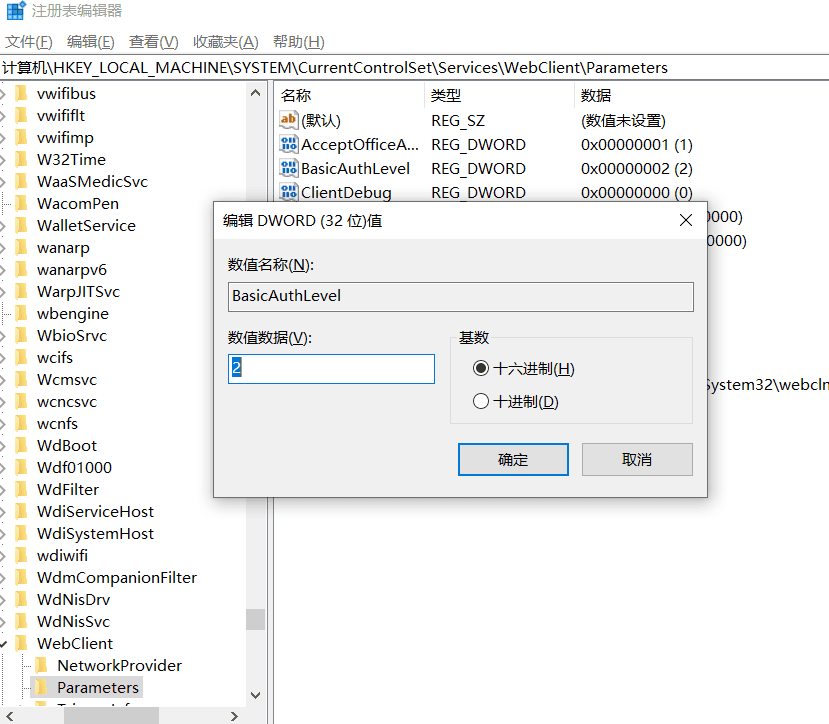
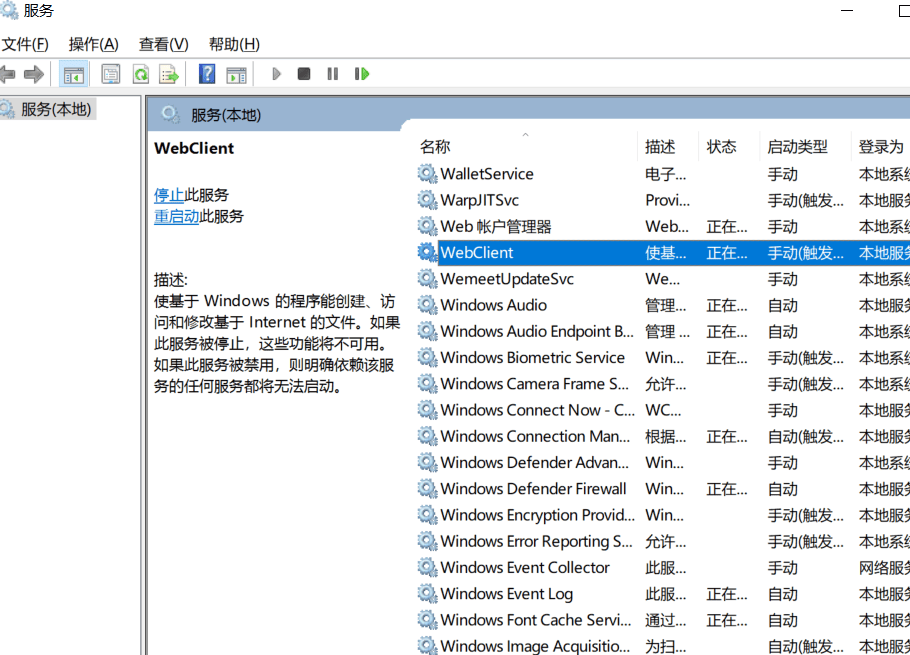
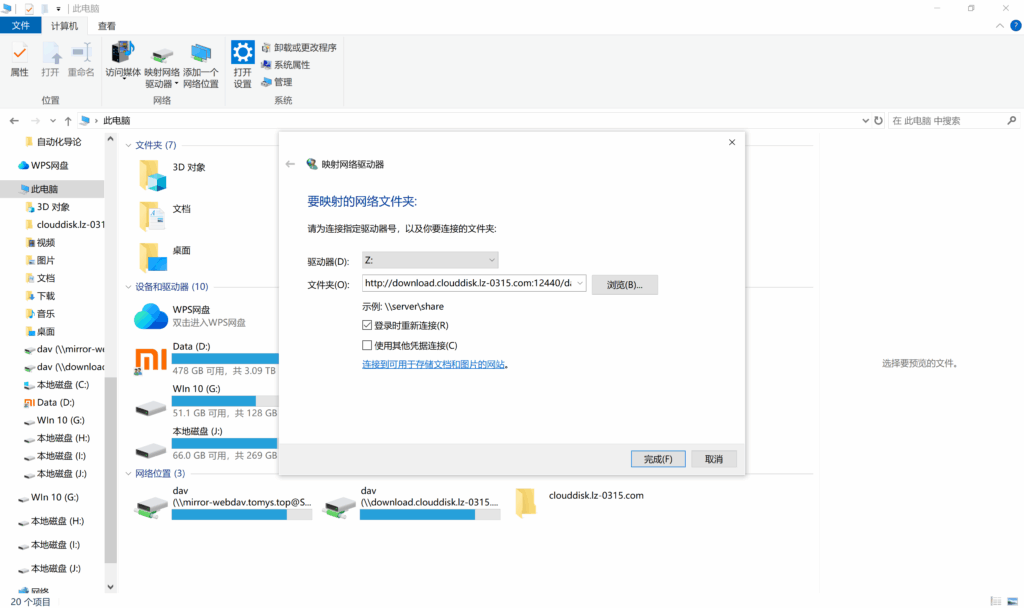
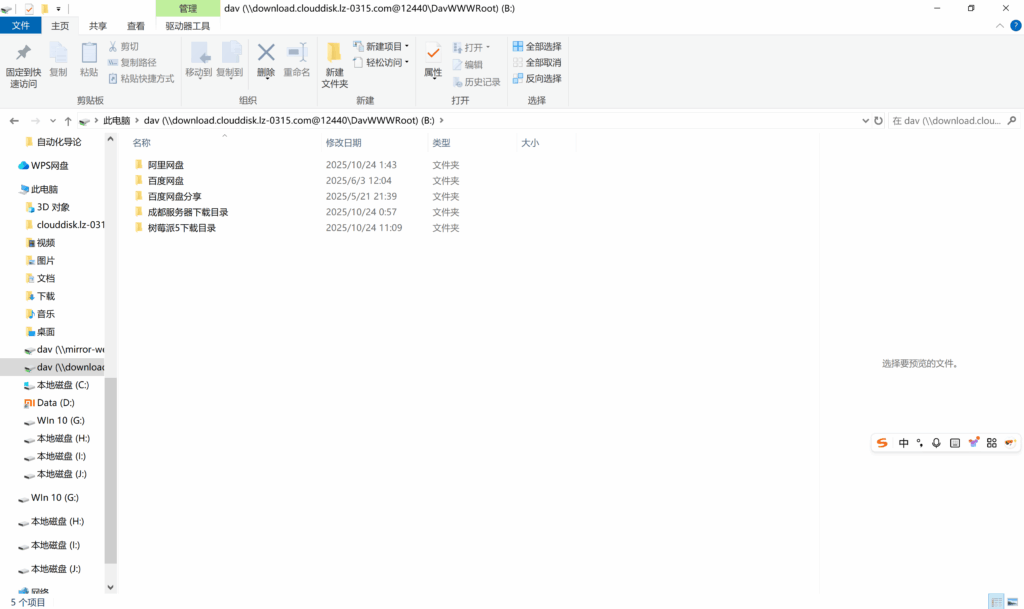
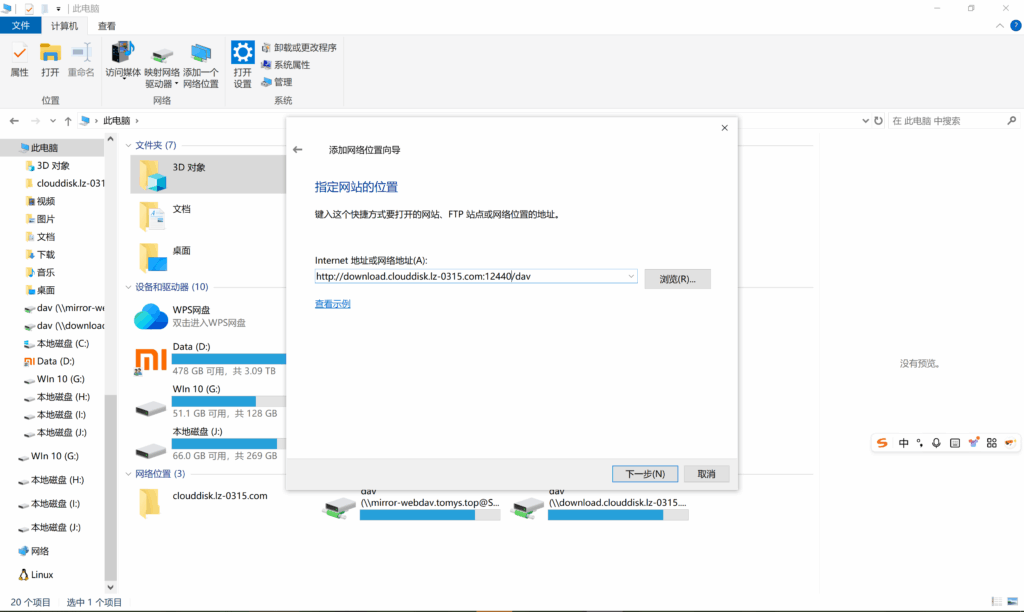
      <![CDATA[<p>正常在windows中操作挂载webdav时，无论是网络驱动器映射，还是添加网络位置，都会出现无法访问，文件无效等报错</p><span id="more"></span>，这是因为windows默认WebClient服务仅支持https协议，当前所使用的http协议是不支持的。<p>如果你坚持使用http协议的webdav，可以通过修改注册表重启WebClient服务方式，但是windows默认的挂载webdav并不是很好用，或多或少会有些兼容性等问题，所以推荐使用RaiDrive（这也是synology推荐的方式，参见<a href="https://kb.synology.com/en-global/DSM/tutorial/How_to_access_files_on_Synology_NAS_with_WebDAV">官方文档</a>）。</p><p>兼容http协议方法如下：</p><p>win+r输入regedit打开注册表编辑器</p><p>计算机 <code>\HKEY_LOCAL_MACHINE\SYSTEM\CurrentControlSet\Services\WebClient\Parameters</code></p><p>将BasicAuthLevel数值改为 <code>2</code>。</p><p><img src="/images/webdav/regedit.png" alt="注册表修改"></p><p>重启WebClient服务</p><p>打开services.msc，找到WebClient，右键”重新启动”。</p><p><img src="/images/webdav/restart-service.png" alt="重启服务"></p><p>重启完成后，就可以实现http方式进行挂载了</p><p>网络驱动器映射挂载</p><p>注：网络驱动器映射挂载后，磁盘空间信息显示的是和当前c盘一样的。</p><p><img src="/images/webdav/network-drive.png" alt="网络驱动器映射"></p><p>最终挂载磁效果：</p><p><img src="/images/webdav/mount-result.png" alt="挂载效果"></p><p>网络位置挂载：</p><p><img src="/images/webdav/network-location.png" alt="网络位置挂载"></p><p>本人辛巳资源站的WebDav地址为：<code>http://download.clouddisk.lz-0315.com:12440/dav</code>，账号和密码皆为 <code>guest</code>。</p><p>其中，辛巳资源镜像站地址为：<a href="http://download.clouddisk.lz-0315.com:12440/">http://download.clouddisk.lz-0315.com:12440</a>。</p>]]>
    </content>
    <id>https://doc.lz-0315.com/posts/2025/10/24/Win10%E6%8C%82%E8%BD%BDWebDav/</id>
    <link href="https://doc.lz-0315.com/posts/2025/10/24/Win10%E6%8C%82%E8%BD%BDWebDav/"/>
    <published>2025-10-24T03:41:46.000Z</published>
    <summary>Windows 10 挂载 WebDav 的解决方案，推荐使用 RaiDrive 绕过默认 HTTPS 限制。</summary>
    <title>Win10挂载WebDav</title>
    <updated>2026-06-10T08:05:18.858Z</updated>
  </entry>
  <entry>
    <author>
      <name>辛巳</name>
    </author>
    <category term="网络" scheme="https://doc.lz-0315.com/categories/%E7%BD%91%E7%BB%9C/"/>
    <category term="Flash" scheme="https://doc.lz-0315.com/tags/Flash/"/>
    <category term="游戏" scheme="https://doc.lz-0315.com/tags/%E6%B8%B8%E6%88%8F/"/>
    <category term="怀旧" scheme="https://doc.lz-0315.com/tags/%E6%80%80%E6%97%A7/"/>
    <content>
      <![CDATA[<p>这个是把4399全部20万个小游戏下载，然后用类似天马的模拟器运行，支持搜索功能，</p><span id="more"></span><p>离线版意义在：</p><ol><li>有些网页关服了，保存离线版还能玩。</li><li>也有一些网页很多广告，体验不佳。</li><li>1G的文件大小，保存在自家电脑上，断网都可以随时玩。</li></ol><p>4399小游戏有很多经典好玩的，比如拳皇WING，痛扁小朋友 闪客快打，魔域2.4 黄金矿工等</p><p>下载地址：</p><h4 id="本帖隐藏的内容"><a href="#本帖隐藏的内容" class="headerlink" title="本帖隐藏的内容"></a>本帖隐藏的内容</h4><p><a href="https://pan.quark.cn/s/6f0a574ef321">https://pan.quark.cn/s/6f0a574ef321</a></p><p><a href="https://www.right.com.cn/FORUM/thread-8443498-1-1.html">转载自：童年回忆！用Flashpoint “离线版4399”免费畅玩经典Flash游戏 FLASH格式 1GB-恩山无线论坛</a></p>]]>
    </content>
    <id>https://doc.lz-0315.com/posts/2025/10/09/Flashpoint%E7%A6%BB%E7%BA%BF%E7%89%884399%E5%85%8D%E8%B4%B9%E7%95%85%E7%8E%A9%E7%BB%8F%E5%85%B8Flash%E6%B8%B8%E6%88%8F/</id>
    <link href="https://doc.lz-0315.com/posts/2025/10/09/Flashpoint%E7%A6%BB%E7%BA%BF%E7%89%884399%E5%85%8D%E8%B4%B9%E7%95%85%E7%8E%A9%E7%BB%8F%E5%85%B8Flash%E6%B8%B8%E6%88%8F/"/>
    <published>2025-10-09T06:08:51.000Z</published>
    <summary>用 Flashpoint 离线畅玩 20 万款经典 Flash 小游戏，断网也能玩，仅 1GB。</summary>
    <title>童年回忆！用Flashpoint &quot;离线版4399&quot;免费畅玩经典Flash游戏 FLASH格式 1GB</title>
    <updated>2026-06-10T08:05:18.858Z</updated>
  </entry>
  <entry>
    <author>
      <name>辛巳</name>
    </author>
    <category term="网络" scheme="https://doc.lz-0315.com/categories/%E7%BD%91%E7%BB%9C/"/>
    <category term="路由器" scheme="https://doc.lz-0315.com/tags/%E8%B7%AF%E7%94%B1%E5%99%A8/"/>
    <category term="SSH" scheme="https://doc.lz-0315.com/tags/SSH/"/>
    <category term="OpenWrt" scheme="https://doc.lz-0315.com/tags/OpenWrt/"/>
    <category term="刷机" scheme="https://doc.lz-0315.com/tags/%E5%88%B7%E6%9C%BA/"/>
    <content>
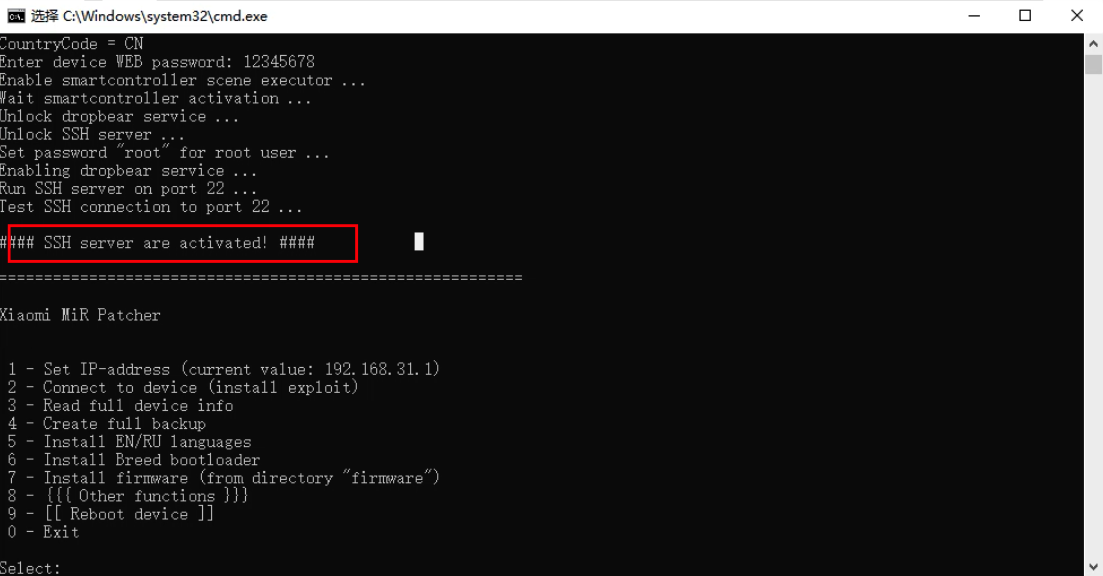
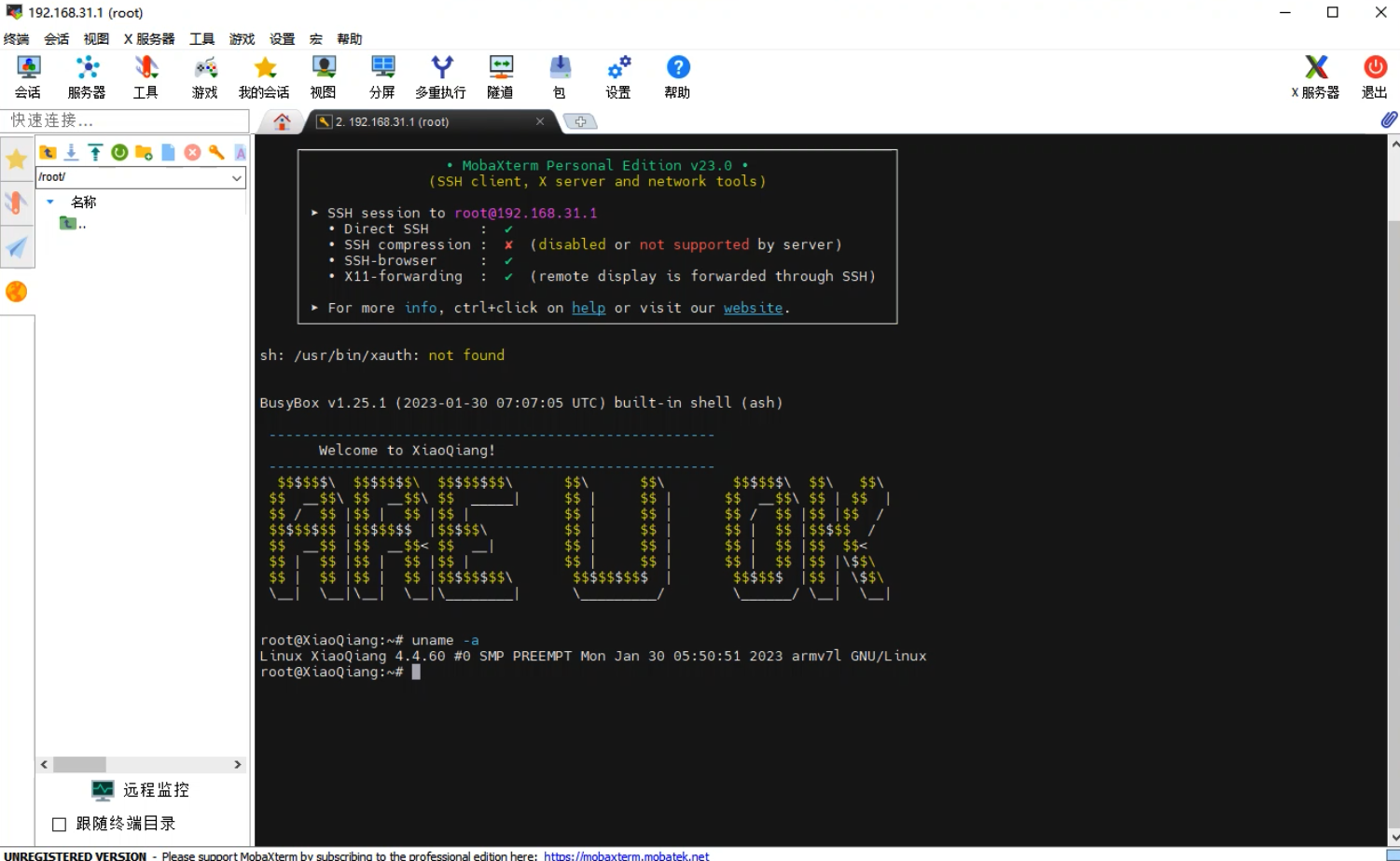
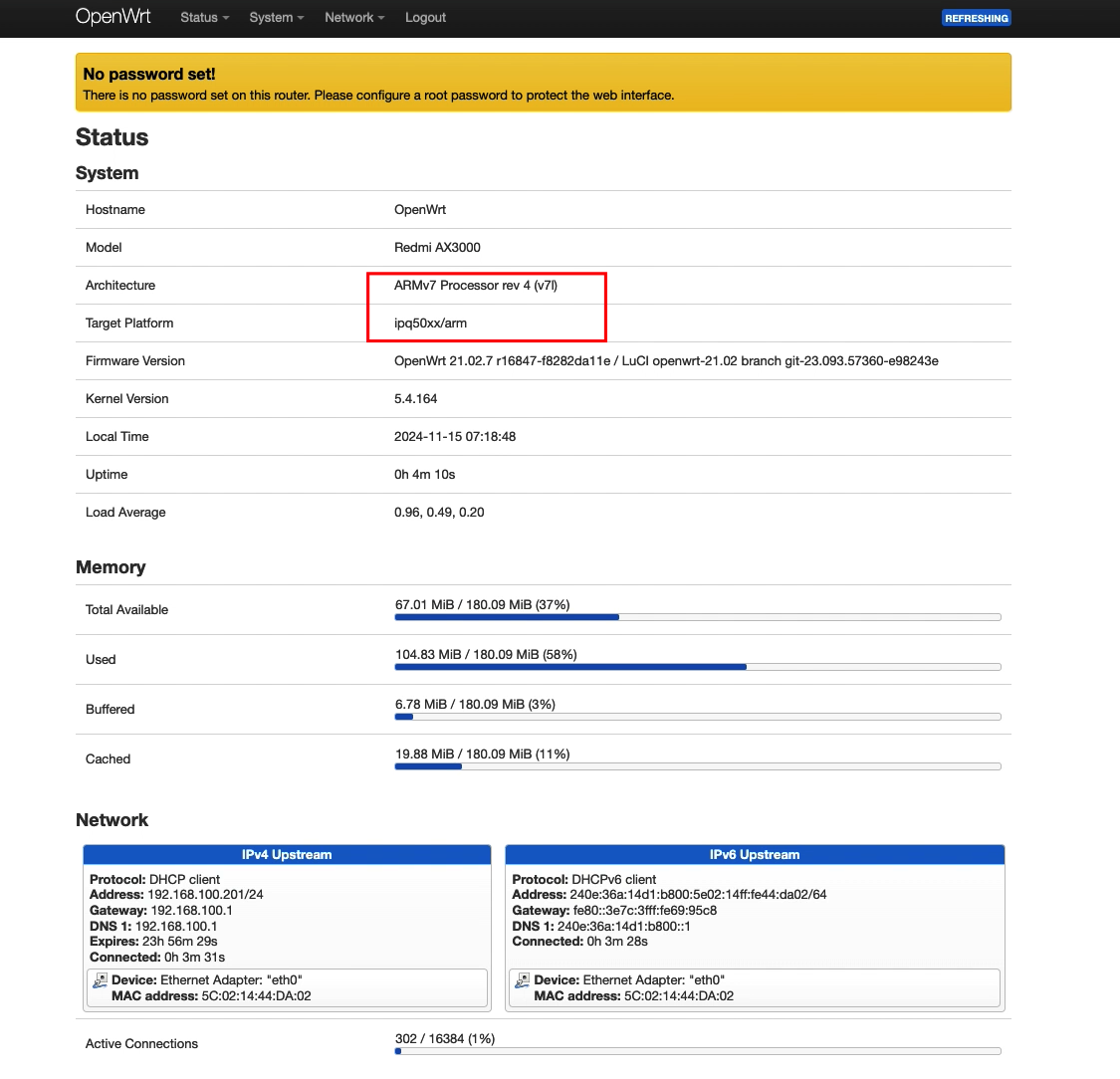
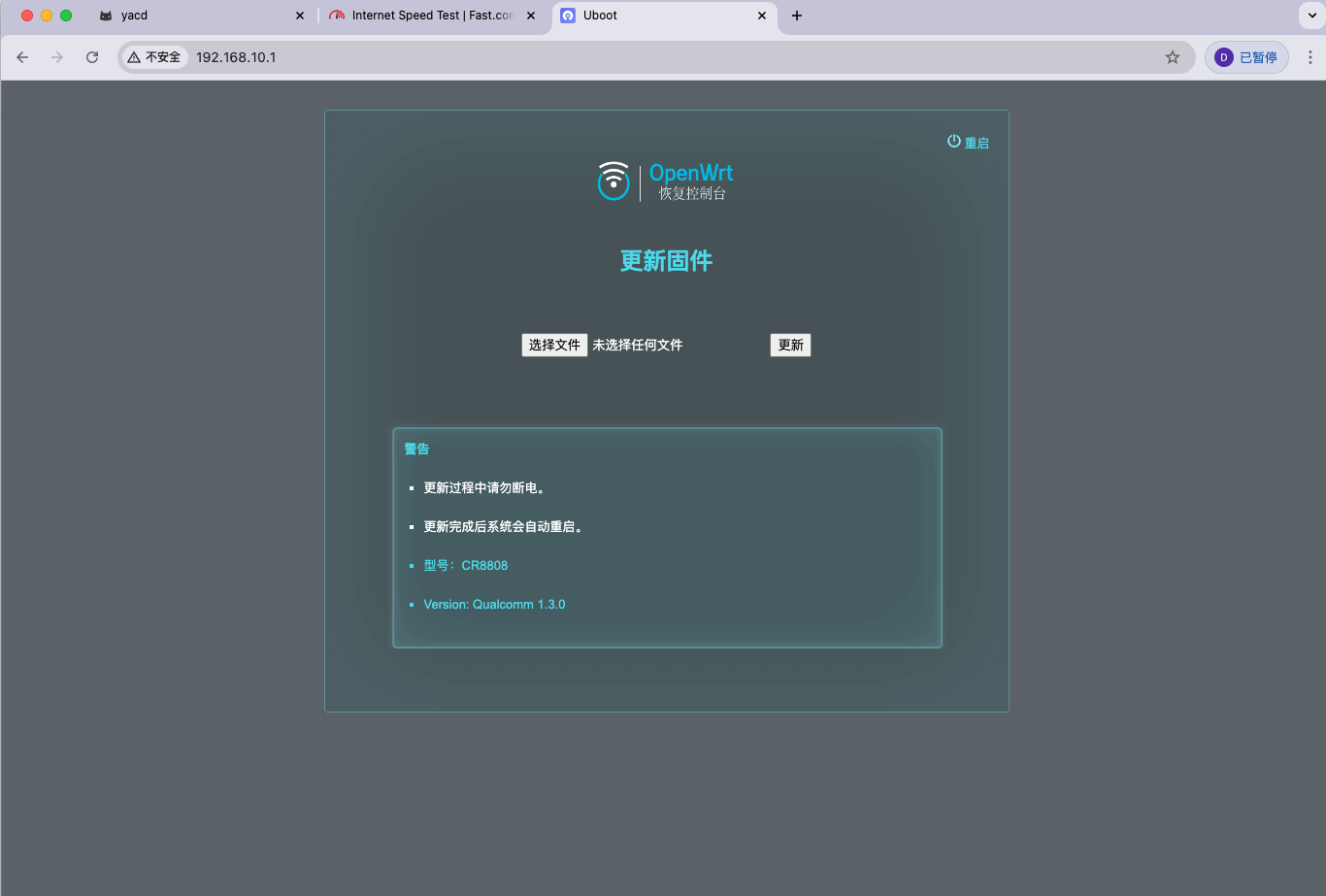
      <![CDATA[<div class="post-pro">  <style>    .post-pro{--content-max:860px;--img-max:860px;--radius:14px;--gap:14px;--shadow:0 10px 30px rgba(0,0,0,.08);font-size:16px;line-height:1.85;color:#222;}    .post-pro *{box-sizing:border-box}    .post-pro p{margin:1em 0}    .post-pro h2,.post-pro h3{scroll-margin-top:90px}    .post-pro h2{font-size:1.5rem;margin:2.2rem 0 1rem;font-weight:800}    .post-pro h3{font-size:1.15rem;margin:1.6rem 0 .6rem;font-weight:700}    .post-pro a{color:#0a6cff;text-decoration:underline}    .post-pro a:hover{opacity:.9}    .post-pro .container{max-width:var(--content-max);margin:0 auto;padding:0 16px}    .post-pro .callout{border:1px solid #e6e6e6;border-left-width:6px;border-radius:12px;padding:14px 16px;margin:18px 0;background:#fafafa}    .post-pro .callout.note{border-left-color:#6c8cff}    .post-pro .callout.warn{border-left-color:#ff7b00;background:#fff8f1}    .post-pro .callout strong{display:inline-block;margin-bottom:6px}    .post-pro .btn{display:inline-flex;align-items:center;gap:8px;border:1px solid #e3e7ef;border-radius:999px;padding:10px 16px;text-decoration:none!important;background:#fff;box-shadow:var(--shadow)}    .post-pro .btn:hover{transform:translateY(-1px)}    .post-pro figure{margin:18px auto;max-width:var(--img-max)}    .post-pro figure.wp-block-image{display:block;text-align:center}    .post-pro figure img{display:block;margin:0 auto;max-width:100%;height:auto;border-radius:var(--radius);box-shadow:var(--shadow)}    .post-pro figure figcaption{color:#666;font-size:.92rem;margin-top:.5rem}    .post-pro ol{padding-left:1.2rem}    .post-pro ol.steps{list-style:none;padding-left:0;counter-reset:step}    .post-pro ol.steps>li{counter-increment:step;margin:14px 0;padding:12px 12px 12px 52px;border:1px solid #eee;border-radius:12px;position:relative;background:#fff;box-shadow:var(--shadow)}    .post-pro ol.steps>li::before{content:counter(step);position:absolute;left:12px;top:50%;transform:translateY(-50%);width:28px;height:28px;display:inline-flex;align-items:center;justify-content:center;border-radius:50%;background:#0a6cff;color:#fff;font-weight:700}    .post-pro code{font-family:ui-monospace, SFMono-Regular, Menlo, Consolas, monospace;background:#f6f8fa;border:1px solid #e7eaf0;border-radius:8px;padding:0 .35em}    .post-pro pre{background:#0b1220;color:#d6e2ff;border-radius:14px;padding:16px;overflow:auto;border:1px solid #1e2a44}    .post-pro pre code{background:transparent;border:none;padding:0;color:inherit}    .post-pro details{border:1px solid #e7eaf0;border-radius:12px;padding:12px 14px;background:#fcfdff;box-shadow:var(--shadow);margin:16px 0}    .post-pro details>summary{cursor:pointer;font-weight:700}    .post-pro hr{border:0;border-top:1px solid #eee;margin:26px 0}    @media (max-width:720px){      .post-pro h2{font-size:1.35rem}      .post-pro .btn{width:100%;justify-content:center}    }  </style><span id="more"></span>  <div class="container">    <p class="lead">红米 AX3000 闲置许久，最近发现 <strong>XMiR-Patcher</strong> 已可一键开启 SSH；并且无需拆机就能在线刷入 <strong>OpenWrt</strong>。下文提供<strong>更清晰的版式、统一的图片尺寸、可复制的命令块</strong>，方便你在 WordPress 文章中直接使用。</p>    <div class="callout warn"><strong>⚠️ 刷机风险提示</strong>    操作存在变砖风险，务必确认机型、固件与分区信息一致，自行承担风险；重要数据请先备份。</div>    <h2 id="ssh">第一步：解锁 SSH</h2>    <p><strong>XMiR-Patcher</strong> 是小米/红米路由器的补丁工具，支持开启 SSH。适配机型较多（如 CR880X 系列、红米 AX5400 电竞版、AC2100、小米万兆、AX3000T 等），<em>大致 2023 年以前的机型成功率较高</em>。</p>    <a class="btn" href="https://github.com/longzheng268/Xiaomi-Router-patcher" target="_blank" rel="noopener noreferrer">GitHub：XMiR-Patcher →</a>    <a class="btn" href="https://2685772537.lanzouo.com/b020by4gnc" target="_blank" rel="noopener noreferrer">蓝凑云网盘镜像（可选，提取码：5lu4） →</a>    <p>Windows 下解压后运行 <code>run.bat</code>，确认默认 IP 为路由器地址，选择 <strong>2</strong>，输入 Web 后台密码，约 3 分钟即可完成解锁。默认 SSH 账户/密码：<code>root / root</code>。</p>    <figure class="wp-block-image"><img src="/images/router/ssh-patcher.jpg" alt="XMiR-Patcher 运行示例" /><figcaption>XMiR-Patcher 运行示例</figcaption></figure>    <figure class="wp-block-image"><img src="/images/router/ssh-success.jpg" alt="解锁成功画面" /><figcaption>出现成功提示后表示 SSH 已开启</figcaption></figure>    <figure class="wp-block-image"><img src="/images/router/ssh-root.jpg" alt="默认 root 帐号" /><figcaption>默认用户与密码均为 <code>root</code></figcaption></figure>    <div class="callout note"><strong>提示：</strong>若继续使用官方固件（保持米家功能），仅开启 SSH 也可满足进阶需求。</div>    <h2 id="openwrt">第二步：在线刷入 OpenWrt</h2>    <p>可选择是否先刷入<strong>大分区 U-Boot</strong>（来自 <em>qaqal</em>），区别在于软件可用空间：<strong>大分区约 80 MB</strong>，默认小分区约 <strong>18 MB</strong>。根据自身需求决定。</p>    <details>      <summary>（可选）刷入大分区 U-Boot —— 展开查看命令</summary>      <div class="callout warn"><strong>重要：</strong>执行写分区前确认机型与分区号完全匹配；建议逐条粘贴执行。</div>      <pre><code>scp "C:\Users\你的用户名\Downloads\MIBIB.bin" root@192.168.31.1:/tmp/scp "C:\Users\你的用户名\Downloads\APPSBL.bin" root@192.168.31.1:/tmp/scp "C:\Users\你的用户名\Downloads\APPSBL1.bin" root@192.168.31.1:/tmp/mtd write /tmp/MIBIB.bin /dev/mtd1mtd write /tmp/APPSBL.bin /dev/mtd11mtd write /tmp/APPSBL1.bin /dev/mtd12# 完成后先不要重启，继续刷入 OpenWrt</code></pre>    </details>    <p>AX3000 固件项目地址：</p>    <a class="btn" href="https://github.com/hzyitc/openwrt-redmi-ax3000" target="_blank" rel="noopener noreferrer">GitHub：openwrt-redmi-ax3000 →</a>    <a class="btn" href="https://2685772537.lanzouo.com/b020by4gnc" target="_blank" rel="noopener noreferrer">蓝凑云网盘镜像（可选，提取码：5lu4） →</a>    <h3>SSH 软刷（双系统槽位）</h3>    <ol class="steps">      <li>登录路由器 SSH，进入临时目录并下载最新工厂镜像（必须确认下载下来了，否则会成砖）：        <pre><code>cd /tmpwget https://github.com/hzyitc/openwrt-redmi-ax3000/releases/latest/download/openwrt-ipq50xx-arm-redmi_ax3000-squashfs-nand-factory.ubi</code></pre>      </li>      <li>查看分区表，确认 <code>rootfs</code> 与 <code>rootfs_1</code> 对应的 mtd 号为 <code>mtd18</code>/<code>mtd19</code>：        <pre><code>cat /proc/mtd[[ "$(grep '"rootfs"' /proc/mtd | cut -d':' -f1)" == "mtd18" ]] || exit[[ "$(grep '"rootfs_1"' /proc/mtd | cut -d':' -f1)" == "mtd19" ]] || exit</code></pre>      </li>      <li>检测当前系统槽位，并将镜像刷到<strong>另一个</strong>槽位：        <pre><code>cat /proc/cmdlinemtd="$(grep -oE 'ubi.mtd=[a-zA-Z0-9\-\_]*' /proc/cmdline | cut -d'=' -f2)"if [[ "$mtd" == "rootfs" ]]; then  # 刷到 system 2  ubiformat /dev/mtd19 -f openwrt-ipq50xx-arm-redmi_ax3000-squashfs-nand-factory.ubi  nvram set flag_try_sys2_failed=0  nvram set flag_boot_rootfs=1  nvram set flag_last_success=1  nvram commitelif [[ "$mtd" == "rootfs_1" ]]; then  # 刷到 system 1  ubiformat /dev/mtd18 -f openwrt-ipq50xx-arm-redmi_ax3000-squashfs-nand-factory.ubi  nvram set flag_try_sys1_failed=0  nvram set flag_boot_rootfs=0  nvram set flag_last_success=0  nvram commitfi</code></pre>      </li>      <li>重启：        <pre><code>reboot</code></pre>      </li>    </ol>    <p>等待重启完成后，访问 <code>http://192.168.1.1</code>，用户名 <code>root</code>，默认密码为空。</p>    <figure class="wp-block-image"><img src="/images/router/openwrt-luci.jpg" alt="OpenWrt 初始界面" /><figcaption>首次进入 LuCI 为英文界面，可在系统中安装中文包</figcaption></figure>    <figure class="wp-block-image"><img src="/images/router/openwrt-lang.jpg" alt="语言包安装" /><figcaption>可按需安装 <code>luci-i18n-base-zh-cn</code> 等中文语言包</figcaption></figure>    <div class="callout note"><strong>进入 U-Boot Web：</strong>若前面刷过大分区 U-Boot，可断电按住 Reset 通电约 10 秒，浏览器访问 <code>192.168.10.1</code> 进入 U-Boot 页面进行后续升级/回退。</div>    <h2 id="links">参考与回退</h2>    <ul>      <li>回官方固件：使用小米官方固件修复工具恢复</li>    </ul>    <hr />    <p><em>说明：</em>本文以红米 AX3000 实测，同策略理论适配 CR880X 系列，但未逐一实操，请读者谨慎验证。</p>  </div></div>]]>
    </content>
    <id>https://doc.lz-0315.com/posts/2025/09/24/%E5%B0%8F%E7%B1%B3%E7%BA%A2%E7%B1%B3%E8%B7%AF%E7%94%B1%E5%99%A8%E8%A7%A3%E9%94%81SSH%E6%95%99%E7%A8%8B%E5%8F%8ACR880x%E5%88%B7%E6%9C%BA/</id>
    <link href="https://doc.lz-0315.com/posts/2025/09/24/%E5%B0%8F%E7%B1%B3%E7%BA%A2%E7%B1%B3%E8%B7%AF%E7%94%B1%E5%99%A8%E8%A7%A3%E9%94%81SSH%E6%95%99%E7%A8%8B%E5%8F%8ACR880x%E5%88%B7%E6%9C%BA/"/>
    <published>2025-09-24T07:14:36.000Z</published>
    <summary>红米 AX3000 使用 XMiR-Patcher 一键开启 SSH 并在线刷入 OpenWrt 的详细教程。</summary>
    <title>小米/红米路由器解锁ssh喂饭级别教程以及CR880x系列刷机（大致 2023 年以前的机型成功率较高）</title>
    <updated>2026-06-10T08:05:18.858Z</updated>
  </entry>
  <entry>
    <author>
      <name>辛巳</name>
    </author>
    <category term="智能车" scheme="https://doc.lz-0315.com/categories/%E6%99%BA%E8%83%BD%E8%BD%A6/"/>
    <category term="STM32" scheme="https://doc.lz-0315.com/tags/STM32/"/>
    <category term="PCB" scheme="https://doc.lz-0315.com/tags/PCB/"/>
    <category term="嵌入式" scheme="https://doc.lz-0315.com/tags/%E5%B5%8C%E5%85%A5%E5%BC%8F/"/>
    <category term="OpenCV" scheme="https://doc.lz-0315.com/tags/OpenCV/"/>
    <content>
      <![CDATA[<style>        /* 全局样式 */        :root {            --primary-color: #3498db;            --secondary-color: #2c3e50;            --accent-color: #e74c3c;            --text-color: #333;            --light-bg: #f9f9f9;            --card-bg: #fff;            --border-radius: 8px;            --shadow: 0 4px 12px rgba(0, 0, 0, 0.1);            --transition: all 0.3s ease;        }        * {            margin: 0;            padding: 0;            box-sizing: border-box;        }        body {            font-family: 'Microsoft YaHei', 'Arial', sans-serif;            line-height: 1.6;            color: var(--text-color);            background-color: var(--light-bg);            background-image:                radial-gradient(var(--primary-color) 0.5px, transparent 0.5px),                radial-gradient(var(--primary-color) 0.5px, var(--light-bg) 0.5px);            background-size: 20px 20px;            background-position: 0 0, 10px 10px;            background-attachment: fixed;            padding: 0;        }        /* 头部样式 */        header {            background: linear-gradient(135deg, var(--primary-color), var(--secondary-color));            color: white;            padding: 2rem 0;            text-align: center;            position: relative;            overflow: hidden;            margin-bottom: 2rem;        }        header::before {            content: '';            position: absolute;            top: 0;            left: 0;            width: 100%;            height: 100%;            background: url('data:image/svg+xml;utf8,<svg xmlns="http://www.w3.org/2000/svg" width="100" height="100" viewBox="0 0 100 100"><rect width="100" height="100" fill="white" fill-opacity="0.05" /></svg>');            animation: moveBackground 60s linear infinite;        }        @keyframes moveBackground {            0% { background-position: 0 0; }            100% { background-position: 1000px 1000px; }        }        .header-content {            position: relative;            z-index: 1;        }        h1 {            font-size: 2.5rem;            margin-bottom: 1rem;            font-weight: 700;            letter-spacing: 1px;        }        h2 {            color: var(--secondary-color);            font-size: 1.8rem;            margin-bottom: 1.5rem;            padding-bottom: 0.5rem;            border-bottom: 3px solid var(--primary-color);            display: inline-block;        }        h3 {            color: var(--primary-color);            font-size: 1.4rem;            margin: 1.5rem 0 1rem;        }        /* 容器样式 */        .container {            max-width: 1200px;            margin: 0 auto;            padding: 0 20px;            position: relative;        }        /* 主内容区 */        .main-content {            display: grid;            grid-template-columns: 1fr;            gap: 2rem;        }        /* 卡片样式 */        .card {            background-color: var(--card-bg);            border-radius: var(--border-radius);            box-shadow: var(--shadow);            padding: 2rem;            transition: var(--transition);        }        .card:hover {            transform: translateY(-5px);            box-shadow: 0 10px 20px rgba(0, 0, 0, 0.12);        }        /* 列表样式 */        ul, ol {            padding-left: 1.5rem;            margin-bottom: 1.5rem;        }        li {            margin-bottom: 0.8rem;            position: relative;        }        .task-list {            list-style: none;            padding-left: 0;        }        .task-list li {            padding-left: 1.5rem;            position: relative;            margin-bottom: 1rem;        }        .task-list li::before {            content: '▶';            position: absolute;            left: 0;            color: var(--primary-color);            font-size: 0.8rem;        }        /* 链接样式 */        a {            color: var(--primary-color);            text-decoration: none;            transition: var(--transition);            border-bottom: 1px solid transparent;        }        a:hover {            color: var(--accent-color);            border-bottom: 1px solid var(--accent-color);        }        /* 强调样式 */        strong {            color: var(--secondary-color);            font-weight: 600;        }        .note {            font-style: italic;            color: #666;            background-color: rgba(52, 152, 219, 0.1);            padding: 0.5rem 1rem;            border-left: 4px solid var(--primary-color);            margin: 1rem 0;            border-radius: 0 var(--border-radius) var(--border-radius) 0;        }        /* 页脚样式 */        footer {            background-color: var(--secondary-color);            color: white;            text-align: center;            padding: 2rem 0;            margin-top: 3rem;        }        /* 响应式设计 */        @media (min-width: 768px) {            .main-content {                grid-template-columns: repeat(2, 1fr);            }            .full-width {                grid-column: 1 / -1;            }        }        @media (min-width: 992px) {            .main-content {                grid-template-columns: repeat(3, 1fr);            }        }        @media (max-width: 767px) {            h1 {                font-size: 2rem;            }            h2 {                font-size: 1.5rem;            }            h3 {                font-size: 1.2rem;            }            .card {                padding: 1.5rem;            }        }    </style><span id="more"></span><header>    <div class="container header-content">        <h1>智能车学习指南</h1>    </div></header><div class="container">    <main class="main-content">        <section class="card full-width">            <h2>比赛规则与平台</h2>            <ul>                <li><strong>全国智能汽车大赛规则详细见：</strong> <a href="https://blog.csdn.net/zhuoqingjoking97298/article/details/143673441" target="_blank">第二十届全国大学生智能汽车竞速比赛规则</a></li>                <li><strong>完全模型细则：</strong> <a href="https://blog.csdn.net/zhuoqingjoking97298/article/details/134667660" target="_blank">第十九届全国大学生智能汽车竞赛-竞速比赛模型组比赛细则（该赛事有取消可能）</a></li>            </ul>        </section>        <section class="card full-width">            <h2>机械建模入门</h2>            <div style="display: grid; grid-template-columns: repeat(auto-fill, minmax(300px, 1fr)); gap: 1rem;">                <a href="https://www.bilibili.com/video/BV1jTLizEENT/?share_source=copy_web&vd_source=794c781902c3c40f0f46ab7c8ed131a1" target="_blank" class="card" style="height: auto; margin: 0;">                    <h3 style="margin-top: 0;">SolidWorks三天速成教程</h3>                    <p>最新最全快速精通教程，全程干货无废话。</p>                </a>            </div>        </section>        <section class="card full-width">            <h2>软件入门</h2>            <div style="display: grid; grid-template-columns: repeat(auto-fill, minmax(300px, 1fr)); gap: 1rem;">                <a href="https://www.bilibili.com/video/BV1YW411x7eN/" target="_blank" class="card" style="height: auto; margin: 0;">                    <h3 style="margin-top: 0;">程序设计入门——C语言</h3>                    <p>浙江大学 翁恺</p>                </a>                <a href="https://www.bilibili.com/video/BV1dh411b7GF/?share_source=copy_web&vd_source=f970661e8a891c441cbb49f75a0134ba" target="_blank" class="card" style="height: auto; margin: 0;">                    <h3 style="margin-top: 0;">智能车制作中的C语言基础</h3>                    <p>智能车所使用的C语言入门（第六七八节）</p>                </a>                <a href="https://www.bilibili.com/video/BV1th411z7sn/?p=40&share_source=copy_web&vd_source=58b3c017920d1598e36ed3a72e94cf50" target="_blank" class="card" style="height: auto; margin: 0;">                    <h3 style="margin-top: 0;">32基础入门（学到第40集）</h3>                    <p>STM32入门教程-2023版</p>                </a>                <a href="https://www.bilibili.com/video/BV18zbFeEEuN/?share_source=copy_web&vd_source=f970661e8a891c441cbb49f75a0134ba" target="_blank" class="card" style="height: auto; margin: 0;">                    <h3 style="margin-top: 0;">智能车入门</h3>                    <p>Bilibili视频教程</p>                </a>                <a href="https://www.bilibili.com/video/BV1bJQeYUERS/?share_source=copy_web&vd_source=f970661e8a891c441cbb49f75a0134ba" target="_blank" class="card" style="height: auto; margin: 0;">                    <h3 style="margin-top: 0;">智能车控制快速入门</h3>                    <p>Bilibili视频教程</p>                </a>                <a href="https://www.bilibili.com/video/BV158CfY6EXk/?share_source=copy_web&vd_source=f970661e8a891c441cbb49f75a0134ba" target="_blank" class="card" style="height: auto; margin: 0;">                    <h3 style="margin-top: 0;">智能车图像处理-八领域扫线分享</h3>                    <p>智能车软件进阶</p>                </a>                <a href="https://www.bilibili.com/video/BV1gz67YrEQN/?share_source=copy_web&vd_source=f970661e8a891c441cbb49f75a0134ba" target="_blank" class="card" style="height: auto; margin: 0;">                    <h3 style="margin-top: 0;">智能车比赛经验分享--图像处理之元素部分</h3>                    <p>智能车软件进阶</p>                </a>                <a href="https://www.bilibili.com/video/BV1kA4y1D7Xp/?share_source=copy_web&vd_source=794c781902c3c40f0f46ab7c8ed131a1" target="_blank" class="card" style="height: auto; margin: 0;">                    <h3 style="margin-top: 0;">20分钟学会GIT版本控制Git+GitHub Desktop</h3>                    <p>团队合作从此不再凌乱，如遇打不开可使用游戏加速器Steam++（Watt ToolKit）加速。</p>                </a>                <a href="https://www.bilibili.com/video/BV1mY411y76c/?spm_id_from=333.337.search-card.all.click" target="_blank" class="card" style="height: auto; margin: 0;">                    <h3 style="margin-top: 0;">AuTop算法改进思路</h3>                    <p>NUIST SCC第一次算法培训</p>                </a>                <a href="https://www.bilibili.com/video/BV1eL411L7NR/?share_source=copy_web&vd_source=794c781902c3c40f0f46ab7c8ed131a1" target="_blank" class="card" style="height: auto; margin: 0;">                    <h3 style="margin-top: 0;">摄像头数字图像处理算法</h3>                    <p>智能车制作加餐</p>                </a>                <a href="https://aistudio.baidu.com/course/introduce/25302" target="_blank" class="card" style="height: auto; margin: 0;">                    <h3 style="margin-top: 0;">零基础实践深度学习</h3>                    <p>飞桨AI Studio星河社区</p>                </a>                <a href="https://www.bilibili.com/video/BV1gr4y1Q7j5/?spm_id_from=333.337.search-card.all.click" target="_blank" class="card" style="height: auto; margin: 0;">                    <h3 style="margin-top: 0;">摄像头数字图像处理算法</h3>                    <p>ROS加餐</p>                </a>            </div>        </section>        <section class="card full-width">            <h2>硬件与PCB入门</h2>            <div style="display: grid; grid-template-columns: repeat(auto-fill, minmax(300px, 1fr)); gap: 1rem;">                <a href="https://www.bilibili.com/video/BV1At421h7Ui/?share_source=copy_web&vd_source=58b3c017920d1598e36ed3a72e94cf50" target="_blank" class="card" style="height: auto; margin: 0;">                    <h3 style="margin-top: 0;">零基础入门PCB设计</h3>                    <p>国一学长带你学嘉立创EDA专业版（先学这个）</p>                </a>                <a href="https://www.bilibili.com/video/BV1fXSNY1Evj/?p=53&share_source=copy_web" target="_blank" class="card" style="height: auto; margin: 0;">                    <h3 style="margin-top: 0;">硬件工程师入门教程</h3>                    <p>电子竞赛必备，再次进阶。（再看这个）</p>                </a>                <a href="https://www.bilibili.com/video/BV1eg4y1v7Xd?p=2&vd_source=8b3cee725b04a82a3634381ab0574f8b" target="_blank" class="card" style="height: auto; margin: 0;">                    <h3 style="margin-top: 0;">用立创EDA画电路图和PCB教程</h3>                    <p>哔哩哔哩视频教程</p>                </a>                <a href="https://www.bilibili.com/video/BV1sv4y1T7UB/?share_source=copy_web&vd_source=794c781902c3c40f0f46ab7c8ed131a1" target="_blank" class="card" style="height: auto; margin: 0;">                    <h3 style="margin-top: 0;">立创EDA（专业版）电路设计与制作快速入门</h3>                    <p>哔哩哔哩视频教程</p>                </a>                <a href="https://www.bilibili.com/video/BV1f54112719/?share_source=copy_web&vd_source=f970661e8a891c441cbb49f75a0134ba" target="_blank" class="card" style="height: auto; margin: 0;">                    <h3 style="margin-top: 0;">智能车基础硬件入门</h3>                    <p>Bilibili视频教程</p>                </a>                <a href="https://www.bilibili.com/video/BV11S4y1a7qb/?share_source=copy_web&vd_source=f970661e8a891c441cbb49f75a0134ba" target="_blank" class="card" style="height: auto; margin: 0;">                    <h3 style="margin-top: 0;">第1讲:智能车主板PCB设计</h3>                    <p>Bilibili视频教程</p>                </a>            </div>        </section>        <section class="card">            <h2>答疑区</h2>            <p class="note">有问题可留言</p>            <ul class="task-list">                <li><strong>大几可以参加比赛？</strong> 任何年级都可以。</li>                <li><strong>每年都可以参加吗？</strong> 是的。</li>                <li><strong>有老师指导吗？</strong> 有。</li>                <li><strong>完成比赛大约花费多少经费？</strong> 约1万元。</li>            </ul>        </section>        <section class="card">            <h2>硬件组</h2>            <p class="note">立创EDA每月2次免费打样</p>            <h3>任务一：直流电机驱动板制作</h3>            <ul class="task-list">                <li>输入电压为12V。</li>                <li>进行电气隔离，将控制器与驱动电路隔离开，防止损坏控制器。</li>                <li>进行GND分割，避免信号干扰。</li>                <li><strong>发挥部分：</strong> 支持电流采样，并进行电流闭环。</li>            </ul>            <h3>任务二：最小系统板绘制</h3>            <ul class="task-list">                <li>输入电源为12V。</li>                <li>芯片型号为意向组别的芯片型号。</li>                <li>引出电机PWM输出以及舵机PWM输出端子。</li>                <li>提供屏幕接口。</li>            </ul>        </section>        <section class="card">            <h2>电控组</h2>            <h3>任务一：学习单片机</h3>            <ul class="task-list">                <li>限定使用STM系列或GD系列单片机。</li>                <li>完成ADC+DMA多通道读取。</li>                <li>完成单个定时器输出多路占空比可调的PWM（发挥：频率也可调）。</li>                <li>学习IIC、CAN等通讯协议，完成IIC驱动OLED屏。</li>                <li>设计一个调参UI，可使用菜单调整PID参数。</li>                <li>学习前后台或RTOS，提高系统的实时性（如在按键检测时不影响其他任务的运行）。</li>            </ul>            <h3>任务二：控制算法</h3>            <ul class="task-list">                <li>在Matlab上实现一个一阶倒立摆模型的控制（可使用串级PID, LQR, MPC等方法）。</li>                <li>制作一个两轮平衡小车，实现电磁循迹或摄像头循迹。</li>            </ul>        </section>        <section class="card">            <h2>视觉组</h2>            <ul class="task-list">                <li>学习相机的逆透视以及去畸变方法及标定，并使用OpenCV实现。</li>                <li>学习二值化算法，并使用OpenCV实现。</li>                <li>学习寻线以及元素识别算法。</li>                <li>完成路径规划。</li>                <li>完成一辆摄像头循迹小车。</li>            </ul>            <h3>测评方式</h3>            <p>提供若干张图片，基于OpenCV完成二值化、边界提取、中线拟合、元素判断。</p>            <p><strong>图片集链接：</strong> <a href="https://pan.baidu.com/s/12ctrjQg2elN5mdcpv1PnMw?pwd=rml9" target="_blank">百度网盘链接</a>（提取码: rml9）</p>        </section>        <section class="card">            <h2>AI组</h2>            <ul class="task-list">                <li>使用Pytorch、TensorFlow或PaddlePaddle完成波士顿房价预测任务。</li>                <li>构建手写数字识别网络完成数字识别。</li>                <li>全流程跑通YOLO，部署到电脑实时运行，完成红蓝锥桶检测。（数据集可在AI Studio平台下载）</li>                <li>提交AI Studio平台的线上赛测评。</li>            </ul>            <p><strong>锥桶数据集：</strong> <a href="https://aistudio.baidu.com/datasetdetail/120244" target="_blank">飞桨AI Studio数据集</a></p>        </section>        <section class="card full-width">            <h2>ROS组</h2>            <h3>任务重点：ROS节点的发布与订阅</h3>            <h3>目标</h3>            <ol class="task-list">                <li>搭建 ROS 2 Humble Hawksbill 环境。(10分)</li>                <li>创建一个 ROS 2 包，包含三个节点：(共60分)                    <ul>                        <li><strong>节点1 (Image Publisher):</strong> 发布带有色带小球的图片数据。(10分)</li>                        <li><strong>节点2 (Image Processor & Publisher):</strong> 接收图片数据，执行颜色识别和边界绘制，然后发布处理后的数据。(20分)</li>                        <li><strong>节点3 (Image Consumer):</strong> 订阅节点2的数据，执行一个特定功能（例如计数图像中小球的数量）。(30分)</li>                    </ul>                </li>                <li>提交工作空间，编写任务三说明文档（<strong>必须项</strong>，写了不加分，不写则任务三不得分）。</li>            </ol>            <h3>要求</h3>            <ul class="task-list">                <li>需要在 Ubuntu 操作系统下安装 ROS 2 Humble Hawksbill。</li>                <li>将颜色识别和边界绘制的 Python 代码转换为 ROS 2 节点。</li>                <li>代码具有清晰的注释，说明每个节点的功能。(额外+20分)</li>                <li>节点间的通信应使用适当的 ROS 2 接口类型（如 sensor_msgs/msg/Image）。</li>                <li>代码内编写一个 README 文件，说明如何构建 ROS 2 包和运行节点。(额外+10分)</li>            </ul>        </section>        <section class="card full-width">            <h2>教育邮箱申请方式及用途</h2>            <p>为规范校园电子邮箱使用和管理，保障学校电子邮箱高效、安全、稳定运行，更好地为师生的教学与科研服务，即日起学校电子邮箱的申请开通线上申请方式。具体操作如下:</p>            <ul class="task-list">                <li>在校生可通过发送邮件到admin@lut.edu.cn邮箱，邮件标题为"申请开通教育网电子邮箱"。</li>                <li>内容包括学生姓名、学号、所在院系、身份证号码和手机号码，并上传学生卡和身份证照片等个人信息。</li>                <li>网信中心工作人员在收到邮件后，核实申请人相关信息，确定无误后工作日在24小时内，寒暑假及法定节假日在48小时内开通邮箱，并将邮箱账号和密码信息回复到申请人发送此申请邮件的邮箱中。</li>                <li>如有疑问可拨打0931-2973957，0931-2973608咨询。</li>            </ul>            <h3>教育邮箱的用途</h3>            <p>拥有教育邮箱可以享受以下教育版优惠和福利，对学习和科研有很大帮助：</p>            <ul class="task-list">                <li>软件与服务：可以免费或以优惠价格使用如Microsoft Office 365（Word、Excel、PowerPoint）、JetBrains系列IDE（如PyCharm, IntelliJ IDEA）、GitHub Student Developer Pack等。</li>                <li>云服务：部分云服务提供商会为教育用户提供免费额度或折扣，如AWS Education。</li>                <li>在线课程与学习平台：一些在线学习平台（如Coursera、edX）会对教育邮箱用户提供课程优惠。</li>                <li>学术资源：可用于注册和访问各类学术数据库、期刊、论文网站，获取更广泛的学术资料。</li>            </ul>        </section>    </main></div><footer>    <div class="container">        <p>© 2025 智能车学习指南 | 版权归属于兰州理工大学智能车协会和兰州理工大学电子设计协会</p>    </div></footer>]]>
    </content>
    <id>https://doc.lz-0315.com/posts/2025/09/11/%E6%99%BA%E8%83%BD%E8%BD%A6%E5%AD%A6%E4%B9%A0%E6%8C%87%E5%8D%97/</id>
    <link href="https://doc.lz-0315.com/posts/2025/09/11/%E6%99%BA%E8%83%BD%E8%BD%A6%E5%AD%A6%E4%B9%A0%E6%8C%87%E5%8D%97/"/>
    <published>2025-09-11T11:26:14.000Z</published>
    <summary>智能车入门学习路线与资源整理，涵盖硬件选型、编程基础和调试技巧。</summary>
    <title>智能车学习指南</title>
    <updated>2026-06-10T08:05:18.858Z</updated>
  </entry>
</feed>
